AI Governance Use Case Design
This topic describes the AI Governance use case design.
On this page
Architecture Diagram
The following diagram shows the relationships between the applications in the AI Governance use case.
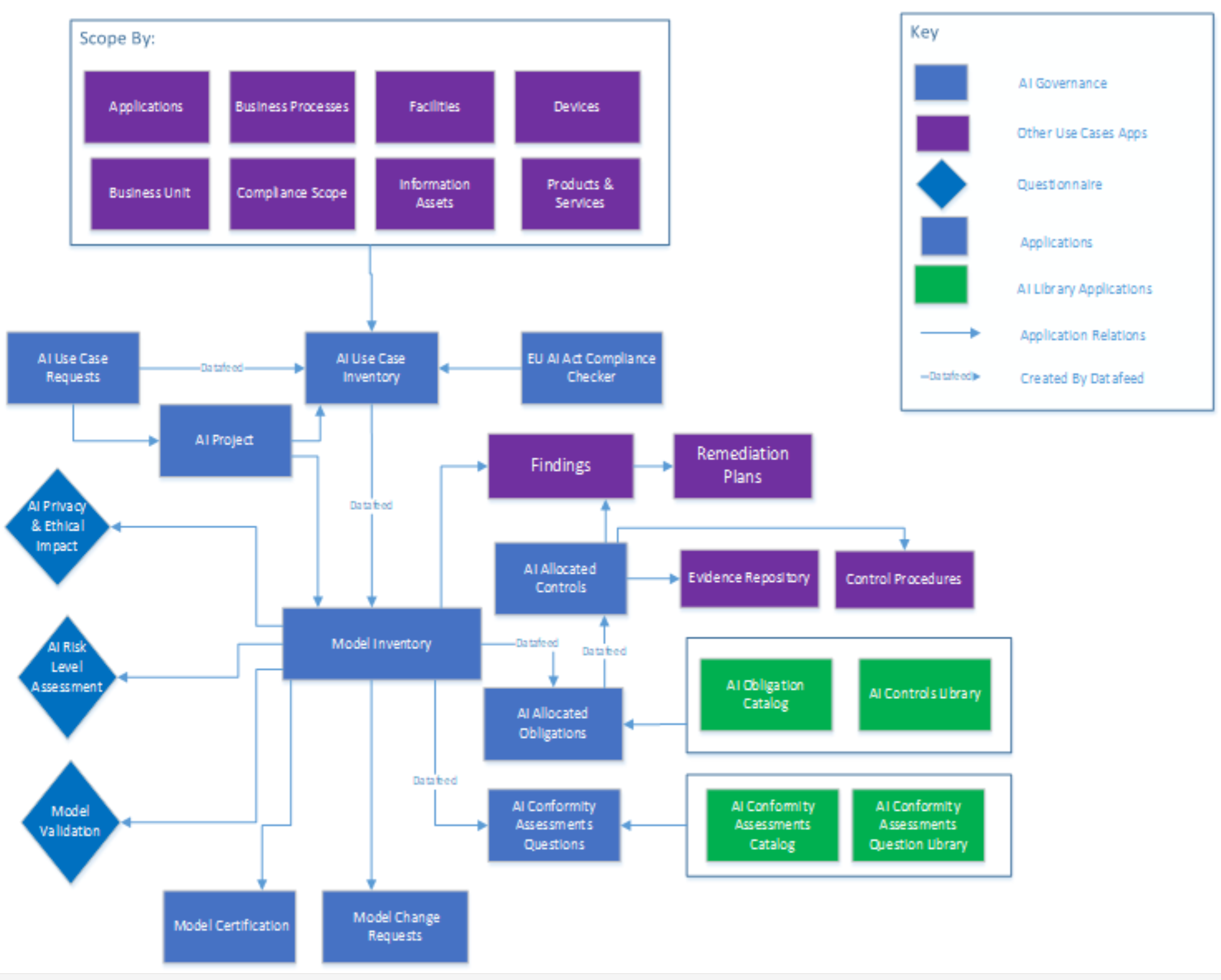
Applications and Questionnaires
|
Application/Questionnaire |
Description |
|---|---|
|
AI Use Case Requests |
The AI Use Case Requests application provides a way for companies to collect information about the AI use case that the business wants to implement.
|
|
AI Use Case Inventory |
The AI Use Case Inventory application is where all of the business AI use cases and functions are stored. An AI inventory differs from other inventories because it centers around an AI use case and not a tool. Each use case and tool combination must be a different inventory record. For example, if you want to use OpenAI for translation, name the use case and inventory "Using OpenAI for Translations," and associate the application to OpenAI. If you want another business use case to use CoPilot, create an inventory record named "Using CoPilot for Translations" and associate the application to CoPilot. The AI Use Case Inventory application handles the following:
|
|
AI Project |
The AI Project application helps your company organize its AI initiatives, features, and projects in one area, as well as organize the workflow and data around a specific project.
|
|
Model Inventory |
The Model Inventory application helps AI Governance teams perform multiple assessments for their initiatives, features, and projects. With the Model Inventory application, users can do the following:
|
|
Model Validation |
The model is validated by the Model Validation. Higher risk models and ones used more frequently must be tested more often. Completed validation is required with a Pass/Fail status, following the steps below:
|
|
Model Certification |
The Model Certification application certifies Model Inventories based on the model validation results. This activity can be performed whenever validation completes or a model needs further certification activity. |
|
Model Change Requests |
The Model Change Requests application is used to raise a change request for the respective Model Inventory record. This is a copy of the Model Risk Management App Pack. As part of the change request, once it’s approved, the necessary changes can be implemented on the Model Inventory record. |
|
EU AI Act Compliance Checker |
The EU AI Act introduces new obligations to entities located within the EU or doing business in the EU. The EU AI Act Compliance Checker application is an interactive application that determines whether your AI system is subject to these regulations or not. Based on the answers provided, the system determines the risk level for the model. |
|
AI Obligation Catalog |
The AI Obligation Catalog application acts as a repository for regulatory requirements. The obligation catalog provides controls library details for each requirement along with defined Risk-level details. The AI Obligation Catalog is used when creating the Allocated Requirements for an AI Model Inventory. |
|
AI Controls Library |
The AI Controls Library application acts as a repository for AI regulatory requirements. Every AI Controls Library record associates with the respective AI Obligation Catalog. The AI Controls Library is used when creating the Allocated Requirements for an AI Model Inventory. |
|
AI Allocated Obligations |
AI Allocated Obligations are generated based on the AI obligation catalog that has been selected and provide the details for allocated controls. |
|
AI Allocated Controls |
AI Allocated Controls are generated based on the AI obligation catalog library that has been selected and provide the details for associated Allocated Obligations selected on the Model Inventory. Users can link the Control Procedures and Evidence Repositories while performing assessments based on Allocated Obligations and Allocated Controls. |
|
AI Conformity Assessment Catalog |
The AI Conformity Assessment Catalog acts as a repository for conformity assessments based on regulations. It serves as an umbrella for all of the assessment questions and obtains a calculated summary from the responses to questions. |
|
AI Conformity Assessments Question Library |
The AI Conformity Assessment Question Library acts as a repository for questions to be used in a Conformity Assessment. This is used when creating Allocated Conformity Assessment Questions. |
|
AI Conformity Assessments Questions |
Based on the Model Inventory application, AI Governance teams can perform conformity assessments using the following:
|
|
AI Privacy & Ethical Impact |
The AI Privacy & Ethical Impact assessment is used to assess privacy and ethical impacts based on answer provided to the following subjects:
|
|
AI Risk Level Assessment |
The AI Risk Level Assessment application is used to assess the entity risks or inventories and projects which are not required to follow the EU AI act. To determine the risk level for a model, users can provide inputs to the following list of areas to assess the risk level governance assessment.
|
Personas and Access Roles
|
Function |
Description |
|---|---|
|
AIG: Admin |
Serves as the administrator for the AI Governance use case, providing create, read, update and delete access rights. |
|
AIG: Owner |
Provides create, read and update access to Library owners within the AI Governance use case. |
|
AIG: Manager |
Provides create, read and update access to management stakeholders within the AI Governance use case. |
|
AIG: Squad |
Provides read and update access for the AI Governance use case. |
|
AIG: Reviewer |
Provides read and update access for the AI Governance use case. |
|
AIG: Read Only |
Provides read-only access for the AI Governance use case. |
For a complete list of access roles and detailed, page-level access rights, see the Data Dictionary.
For a complete list of application record permission fields, including which user/groups fields populate the fields and where the fields inherit permissions from, see the Data Dictionary.
For a complete list of detailed, page-level access rights, see the Data Dictionary. For more information about the Data Dictionary, see Data Dictionary.
Dashboards
|
Dashboard |
Description |
|---|---|
|
AI Governance Team |
This dashboard provides complete details for AI Inventory, AI Request, High Risk Assessment, and allocated controls statuses. |
|
Business Review Team |
This dashboard provides details for open requests and the details for assigned inventories. |
Data Feeds
|
Data Feed |
Description |
|---|---|
|
AIRM-01: Create AI Inventory Record |
This data feed creates AI Inventory records once the AI Use Case Request is approved by a reviewer. |
|
AIRM-02: Create AI Model Inventory |
This data feed creates AI Inventory records once the AI Use Case Request is approved by a reviewer. |
|
AIRM-03: Create Allocated Obligations and Controls |
This data feed creates Allocated Obligations and Allocated Controls records on the Model Inventory. |
|
AIRM-04: Create Conformity Allocated Questions |
This data feed creates Conformity Allocated Questions records based on the Model Inventory application's Regulation and Risk Level (High Risk) of EU AI ACT Compliance Checker assessment. |
Data Dictionary
The AI Governance Data Dictionary contains configuration information for the use case.
You can obtain the Data Dictionary for the use case by contacting your Archer Technologies Account Representative.


