Archer Audit Management Solution
Archer Audit Management gives internal audit teams a modernized, risk-based framework for planning and executing audits.
This solution is part of Archer Core Solutions.
For information on the latest changes to the solution, see the Release Notes.
On this page
Key Components
Solution Architecture
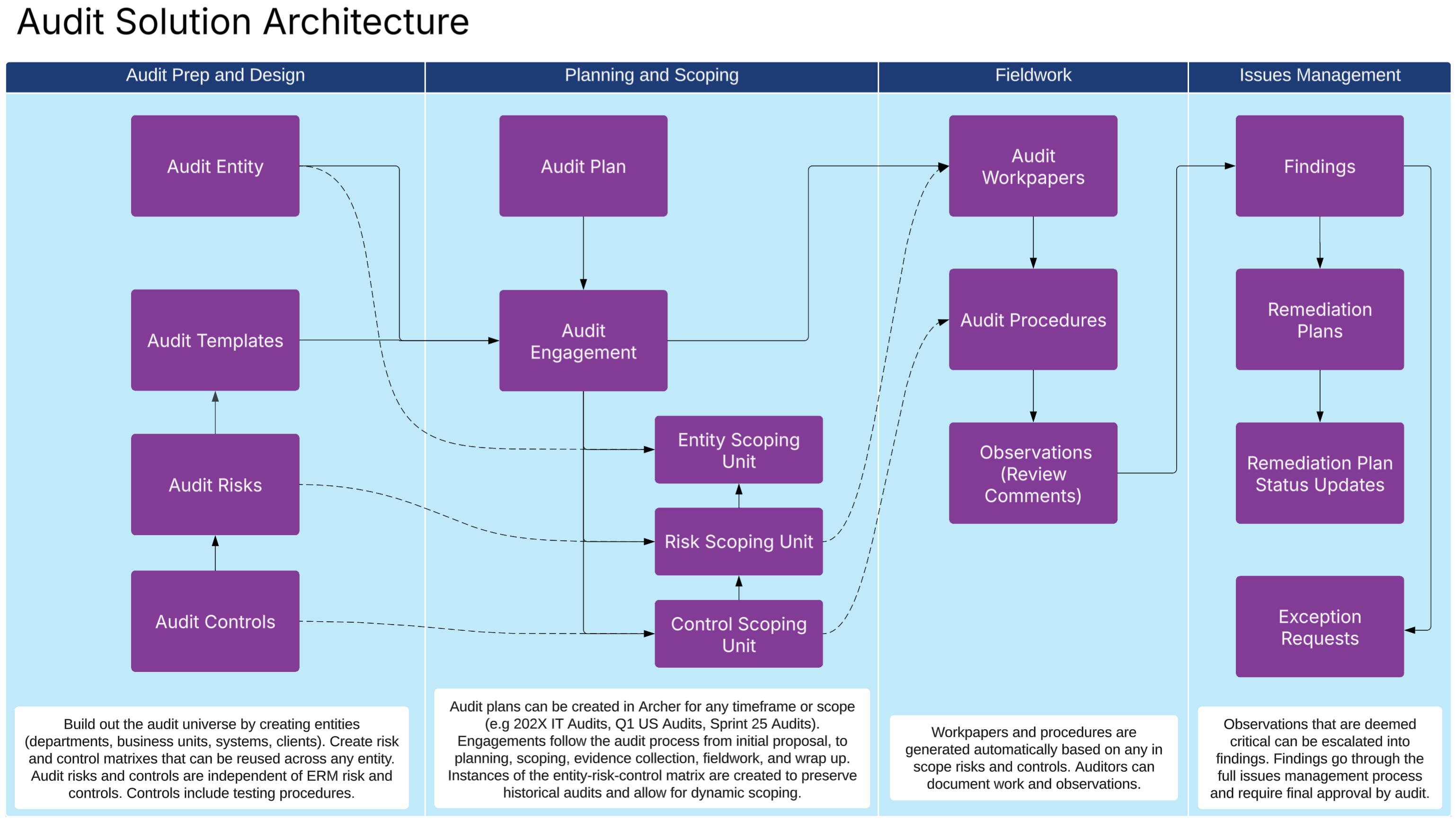
The following diagram shows the relationships between the applications in the solution.
Core Applications
|
Applications |
Description |
|---|---|
|
Audit Entity |
Audit entities are used to define what is subject to audit. Audit entities can be risk assessed to help with prioritization. |
|
Audit Templates |
Defines reusable audit templates including risks, controls, and testing procedures. Each new engagement requires a template, which can apply to any entity. |
|
Audit Risks |
Contains standardized audit risks that are reusable across entities. Audit Risks must be tied to a template, but can be used across multiple templates. This is an audit list that is not dependent on enterprise risk management risks. |
|
Audit Controls |
Contains standardized audit control procedures. It includes general control details, including a description of acceptable evidence and testing procedures. It can be linked to audit risks on an audit template. |
|
Audit Plan |
A time-focused, structured plan that outlines strategy, scoping, and timing for performing a set of audit engagements. Plans are used to group related audits, define a time frame, and align audits with organizational risk priorities or compliance obligations. Plans can be as broad as 202X Audits or as narrow as IT Audits - Sprint 15. |
|
Audit Engagement |
An individual execution of a specific audit. It’s a detailed project that follows the full audit lifecycle from initial proposal through reporting and issues management. Audit engagements start with the selection of an entity to assess and a template to use. Once prioritized, they allow users to plan the audit, scope in and out risks and controls from the template, test audit procedures and conduct fieldwork, and document observations and findings. |
|
Entity Scoping Unit |
A snapshot of the entity being assessed. This is created by the system and helps build out the entity-risk-control matrix on a specific engagement. |
|
Risk Scoping Unit |
A snapshot of the risks from the used audit template. This is created by the system and helps build out the entity-risk-control matrix on a specific engagement. It ties directly to the entity scoping unit. |
|
Control Scoping Unit |
A snapshot of the controls from the used audit template. This is created by the system and helps build out the entity-risk-control matrix on a specific engagement. This ties directly to the risk scoping unit. |
|
Audit Workpapers |
A record created by the system to capture testing activities, evidence, and commentary. One workpaper is created for each risk scoping unit that is marked In Scope on the engagement. It's a way to bundle similar audit procedures. |
|
Audit Procedures |
A record created by the system to document a specific test or activity that an auditor performs to evaluate whether a risk is effectively controlled or a process is functioning as intended. Auditors determine for each procedure if the control is operating and designed effectively. |
|
Observations |
Preliminary notes or review comments made by the auditor during fieldwork. Observations are made when something appears unusual, non-compliant, or needs clarification, but hasn’t yet been confirmed as a formal issue or finding. |
|
Findings |
A formal audit result that identifies a problem, deficiency, or gap in controls, processes, or compliance based on evidence gathered in the audit engagement. Synonymous with issues. Final approval is conducted by audit once the issue is remediated. |
Access Groups
|
Group Name |
Description |
|---|---|
|
Audit Management |
Full admin access to all Audit applications. |
|
Audit User |
Limited access to all Compliance applications. Users in this group can own engagements, evidence, and workpapers. |
Data Feeds (Automations)
|
Data Feed |
Description |
|---|---|
|
DF.AU.AWF.01.01 Create Engagement Scope from Template |
Runs when the engagement moves into the planning phase through the advanced workflow. The feed creates the entity-risk-control matrix based on the entity and template selected. |
|
DF.AU.AWF.01.03 Create Workpapers from Engagement (AWF) |
Runs when the engagement moves to the fieldwork phase through the advanced workflow. The feed creates a workpaper record for each risk scoping unit and an audit procedure for each control scoping unit. |
|
DF.AU.AWF.01.02 Create Evidence from Control Scoping Units (AWF) |
Runs when the engagement moves to the fieldwork phase through the advanced workflow. The feed creates one evidence record per control scoping unit that is in scope, and assigns it to the business contact. |
Dashboards
| Dashboard | Description |
|---|---|
|
Compliance Overview |
This dashboard is for compliance managers to see an overview of control activities, control mapping, and quick links to start testing. |
|
Regulatory Change Management |
This dashboard is for regulatory compliance and legal teams to see regulatory intelligence that is coming in and to see the status of regulatory reviews. |
Workflow Overview
This section provides step-by-step guidance for key audit workflows in Archer.
Creating the Audit Universe
To define the auditable units in your organization, use the Audit Entity application.
-
Navigate to the Audit Entity application and click Add New.
-
Enter the entity name and select the entity type.
-
Add region, owner, and business function attributes.
-
(Optional) Attach documentation or evidence.
-
Fill out the risk assessment to determine relative priority and acceptable audit frequency.
-
Click Save.
Creating an Audit Template
Audit templates are aneffective way to see if an organization is mitigating risks and maintaining compliance. Defining reusable audit engagement templates help scale audit programs. These templates determine the workpapers and procedures on the engagements.
-
Navigate to the Audit Template application and click Add New.
-
Provide a name, scope, and overview of the audit template.
-
Navigate to the Audit Risks section and click Add New.
-
Enter the risk, impact, and likelihood rating.
-
To create an audit control for your risk, do the following:
-
Navigate to Audit Controls and click Add New.
-
Define the control and acceptable evidence and testing procedures.
-
Click Save.
-
-
Click Save.
Creating and Managing an Audit Plan
Plan audit engagements across timeframes or scopes by creating an audit plan.
-
Navigate to the Audit Plan application and click Add New.
-
Enter a plan name and define the time frame
-
Add details like audit cycle owner and review dates.
-
In the Engagements sub-form, click Add New Engagement for each proposed audit (see Creating and Managing Audit engagement).
-
Click Submit.
Creating & managing an audit engagement
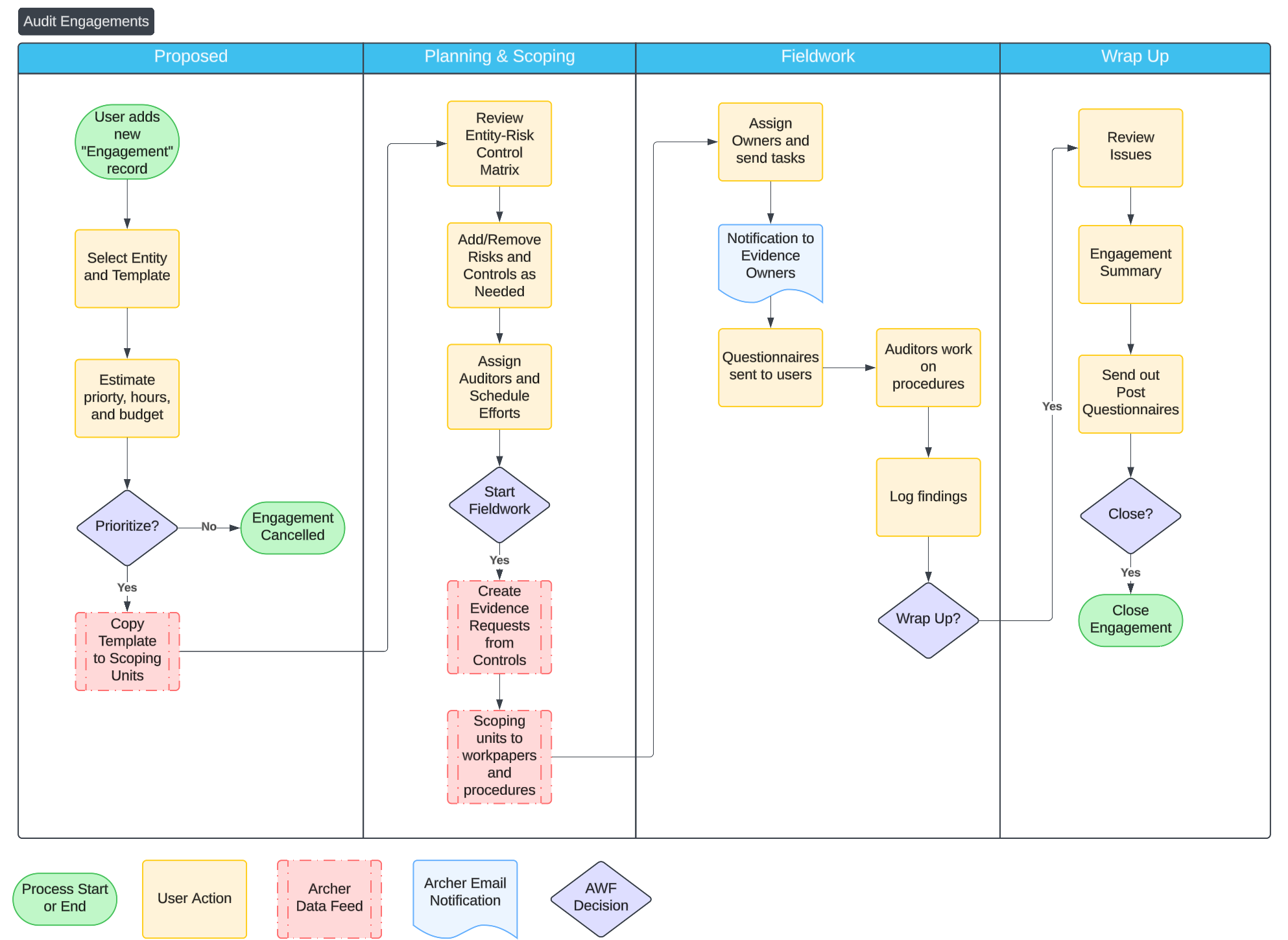
The following diagram shows the process of creating and managing an audit engagement.
Frequently asked questions
What data should I have in place before I get started?
|
Application |
Format |
Priority |
|---|---|---|
|
Audit Entities |
A list of who and what the audit team will assess. Processes, business units, regions, and systems are all Audit Entities. |
Required |
|
Audit Templates (Audit Risks and Controls) |
A list of audit risks, a list of audit controls that ties to those risks, and a list of templates those risks should be associated with. |
Required |
Can I change the questions on the procedures?
Yes. You can make changes to questions to meet your business needs. Changing the values lists of results and adding additional questions can make this application better align with your program.
If we are not ready for control tests, is there a way to still mark the effectiveness of the controls?
Yes. Navigate to the controls application as an admin, then modify Control Effectiveness Rating to be a manually-set field. This allows users to select the control effectiveness right on the control, simplifying the process.
You may also want to remove the full control tests from the layout and related testing fields. Additionally, you can make Control Effectiveness Rating a private field and assign users and groups access to it.
Why are Audit Risks and Audit Controls separate from our enterprise risk and control libraries? Can we link them?
The separation is intentional. An internal audit requires an independent view of what risks and controls should exist for a given audit, not a report of what a business says it has. If you start an engagement from an existing control library, you can only test the effectiveness of controls already documented, which can result in missed gaps.
You can link Audit applications and libraries through a control scoping unit. When you create an engagement from an Audit Template, a data feed creates one control scoping unit for each Audit Control on the template. During the scoping phase, you can map each control scoping unit to the matching control from the operational library. If a cross-reference field doesn't already exist, it can be added by am Archer admin. Once mapped, you can see related control tests, descriptions, owners, and history without duplicating the source-of-truth control record.
If you want to preserve the mapping across audits, Professional Services can build a data feed to copy a prior engagement forward when starting a new one. The auditor has the option to start from a template or start from a previous engagement, which carries the existing mappings with it.
How does the Audit Controls application differ from the Controls application?
The Controls application is your operational control library, or the controls the business runs day to day. It's owned by control owners and tested by the compliance team.
The Audit Controls application holds the expected controls an audit uses as a baseline for an engagement. Each Audit Control captures what the control should look like, what acceptable evidence is, and the testing procedure the auditor uses. Audit Controls live on Audit Templates and exist independently of Operational Controls, which is what allows auditors to surface control gaps rather than just test what's already in place.
Once an engagement is underway, you can link Audit Controls to the Operational Controls through the control scoping units, giving you the connection between the two without merging them.
Is there a data feed to escalate an Observation into a Finding?
Out of the box, no. Observations are designed to be lightweight. Think of them as review notes captured during fieldwork. Once the auditor decides which observations rise to the level of a formal issue, they open the Observation and add a Finding from there. Some manual carry-over is expected, since the Finding captures more structured detail than the observation.
If your team escalates Observations frequently and wants to streamline the process, Professional Services can add a data feed that copies an Observation into a Finding. This is a common customization and a good fit for audit programs that produce a high volume of Findings.