Archer Compliance Management Solution
The Archer Compliance Management solution provides compliance teams a structured approach to documenting policies, standards, and controls, tying them to regulations, and performing control testing with evidence collection.
This solution is part of Archer Core Solutions.
On this page
Key Components
Solution Architecture
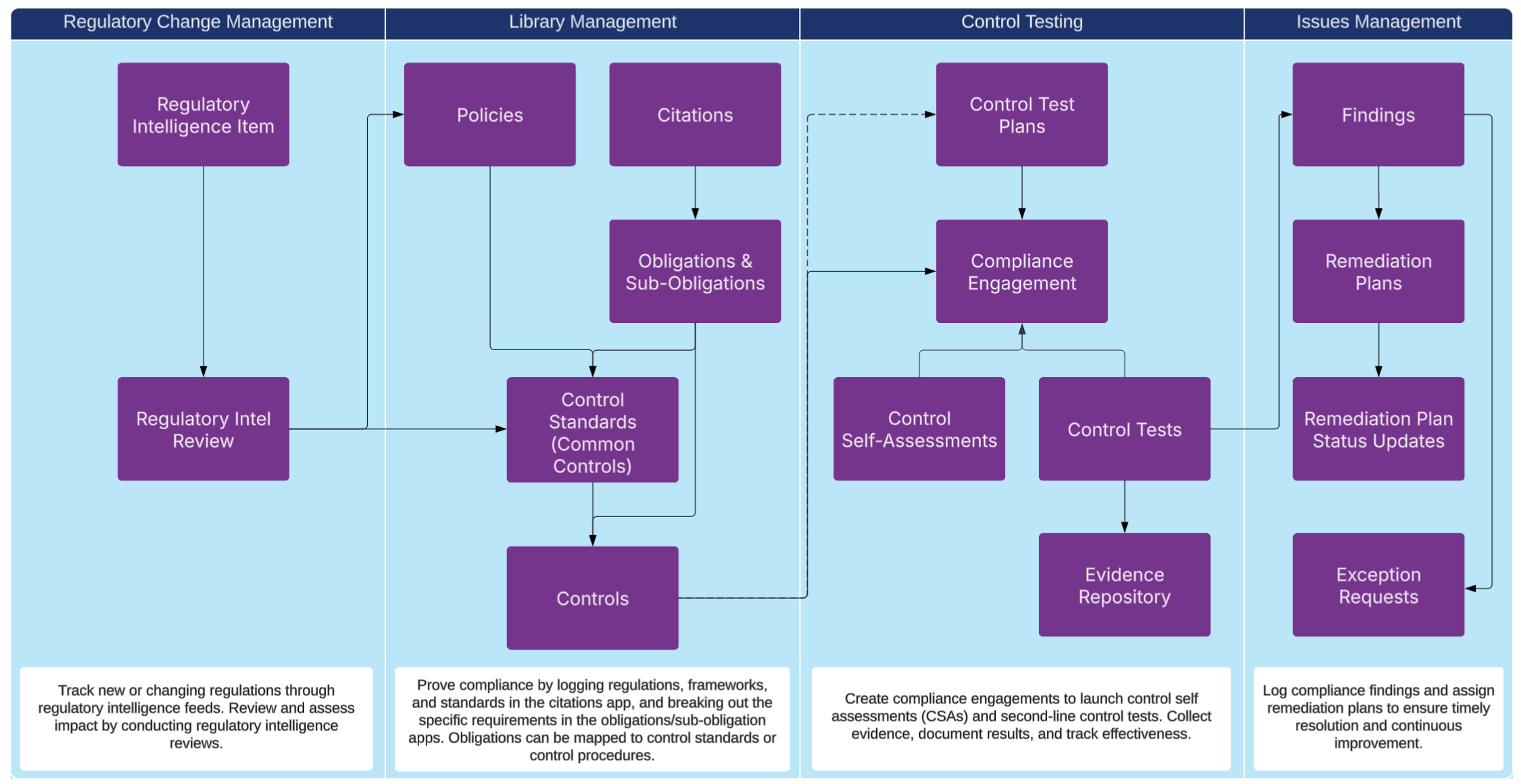
The following diagram shows the relationships between the applications in the solution.
Core Applications
| Applications | Description |
|---|---|
|
Authoritative Sources |
Repository of external regulations, standards, and frameworks that drive compliance requirements. |
|
Obligations |
Specific requirements derived from authoritative sources that the organization must comply with. These can also come from third party contracts, internal policies, or other sources. Each obligation should be managed. Obligations that don’t have mapping to control standards are considered compliance gaps. |
|
Policies |
Internal policy documents that outline the organization’s rules, expectations, and compliance stance. |
|
Control Standards |
Standardized control categories or requirements aligned to policies and regulations often called Common Controls. It is the bridge between controls and obligations. |
|
Controls |
A procedure, action, or policy that enforces control standards and mitigates risks. |
|
Compliance Engagement |
A structured way to test multiple controls at once. |
|
Control Test Plan |
A reusable bundle of controls that can be tested in a compliance engagement. |
|
Evidence Repository |
Central storage for documentation and artifacts that support control implementation, testing, and evidence requesting. |
|
Control Self-Assessment |
A self-evaluation of controls performed by control owners to see if they are implementing the control and if it's operating effectively. |
|
Control Test |
A test determining the execution of control testing, results, design and operating effectiveness, and identifiable issues. |
Access Groups
| Group Name | Description |
|---|---|
|
Compliance Management |
Full admin access to all Compliance applications. |
|
Compliance User |
Limited access to all Compliance applications. Users in this group will be allowed to own controls, evidence, policies, and tests. |
Data Feeds (Automations)
| Data Feed | Description |
|---|---|
|
DF.CM.AWF.01.01 Copy Test Plan Procedure References to Compliance Engagement |
This data feed runs at the control selection stage of the compliance engagement when you use the AWF option Complete Selection. If a user chooses to use a reusable control test plan in the compliance engagement, this feed copies the controls from the test plan into the compliance engagement. Only the cross reference relationships are added. |
|
DF.CM.AWF.01.02 Create Self-Assessments from Compliance Engagement (AWF) |
This data feed runs in the compliance engagement when a user selects Launch Tests. It creates one control self-assessment for each control on the compliance engagement. |
|
DF.CM.AWF.01.03 Create Control Tests from Compliance Engagement |
This data feed runs in the compliance engagement when the user selects Launch Tests. It creates one control test for each control on the compliance engagement. |
|
DF.CM.AWF.01.04 Create Control Tests Evidence Record from Control Test |
This data feed runs in the compliance engagement when the user selects Launch Tests and after the control tests have been created. It creates an evidence request for each control test on the compliance engagement. |
Dashboards
| Dashboard | Description |
|---|---|
|
Compliance Overview |
This dashboard is for compliance managers to see an overview of control activities, control mapping, and quick links to start testing. |
|
Regulatory Change Management |
This dashboard is for regulatory compliance and legal teams to see regulatory intelligence that is coming in and to see the status of regulatory reviews. |
Workflow Overview
This section provides step-by-step guidance for key workflows.
Report on a Regulation, Standard, or Framework
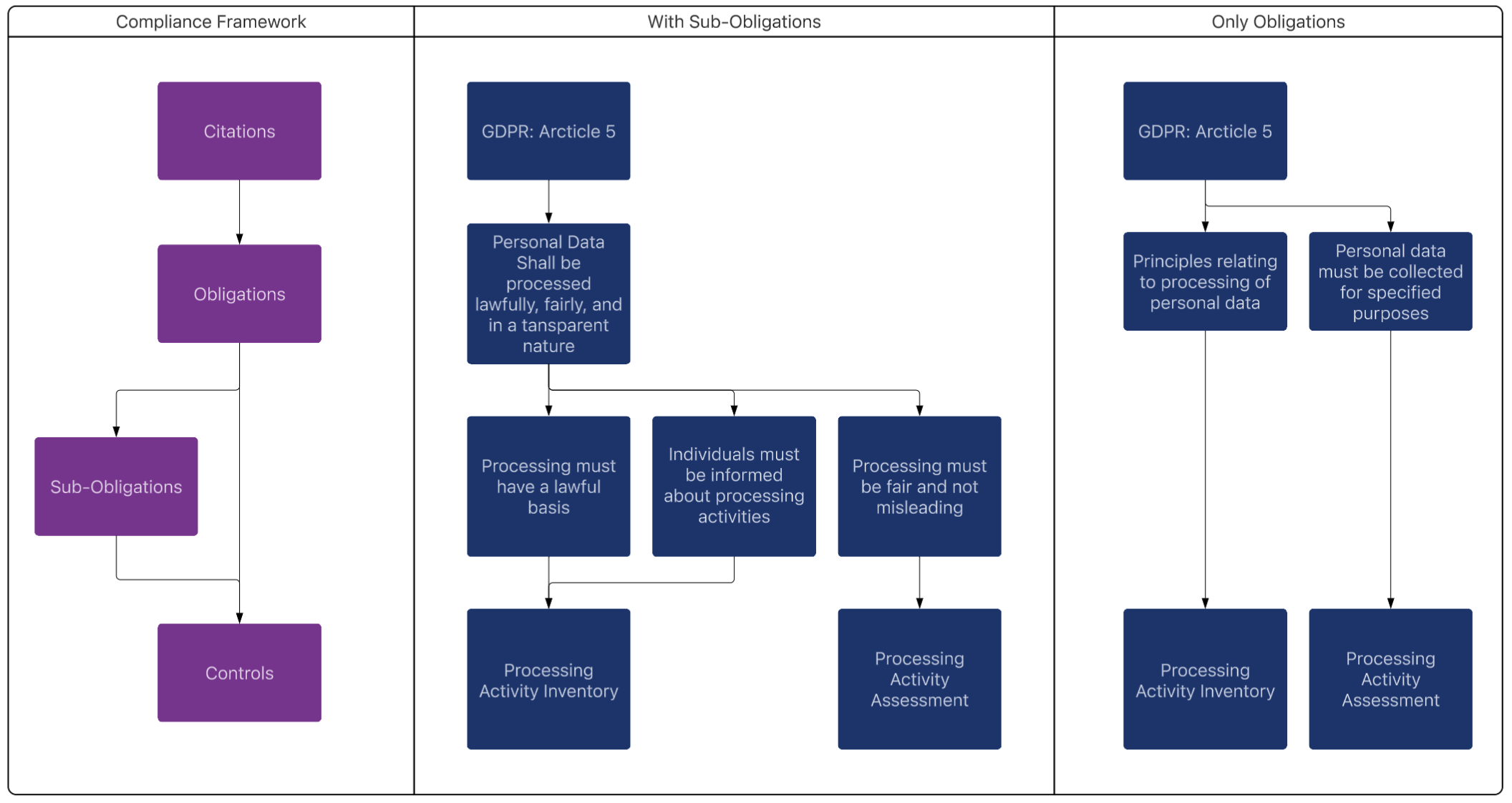
Corporate compliance requires organizations to understand the necessary laws, regulations, and obligations they must follow. In Archer, regulations, standards, and frameworks are all stored within the Citations application. They can be created manually or can be ingested via Evolv Compliance, if licensed. They must be marked as reportable citations before they show up on the dashboards and reports.
Creating Citations Manually
When creating citations manually, it's best to create one record for the regulation, standard, or framework that needs to be tracked, then create obligations below it to track the actual requirements.
The following steps detail how to create a new citation:
-
Add a new record in the Citation application.
-
Enter details such as the name of the regulation, framework, standard, or item.
-
Click Yes on the Reportable Citation field.
Marking Citations as Reportable
Citations is a self-referencing application that can store deep hierarchies of data. The citations that come in Evolv Compliance are built with this hierarchical structure.
To simplify the reporting, compliance managers can pick which level they want to report obligations on through the following steps:
-
Find the citation requiring a report.
-
Edit the record.
-
Click Yes on the Reportable Citation field.
All obligations that roll up to a citation should roll up to the parent citations so that higher level parents connect to all obligations below them. If you're creating citations manually, create all obligations under one citation record and mark them as reportable.
Tracking and Mapping Obligations
The Obligations application tracks compliance requirements across various regulations, frameworks, and standards. Each citation may have multiple obligations to be tracked. Each obligation created is used to determine the overall compliance level with a regulation.
The following steps detail how to create an obligation:
-
Add a new record in the obligations application.
-
Provide a name and enter details about the obligation.
-
Map the obligation to a citation.
Once an obligation is created, there are multiple ways to satisfy it. You can create or look up a control or standard for the obligation, or create sub-obligations and complete the mapping at that level. Archer assumes any controls directly connected to the obligation satisfy the obligation. If no controls or standards are directly connected to the obligation, it searches to see if there is mapping at the sub-obligation level and calculates the amount of mapping provided. If no controls or standards are present in the obligations or sub-obligations, then the control mapping status displays as a control gap.
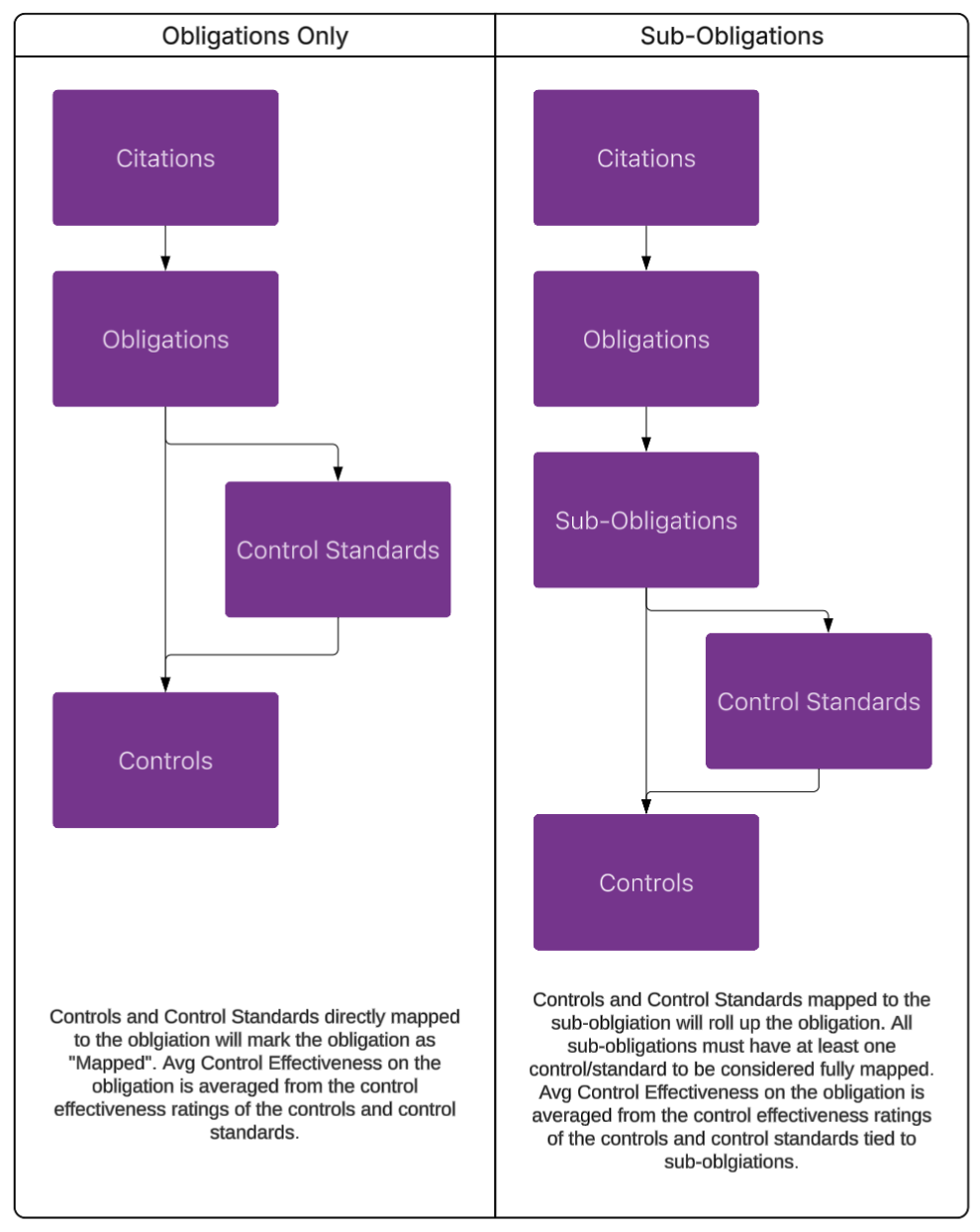
There are two ways to structure regulatory requirements in Archer: using Obligations Only or using Obligations with Sub-Obligations. Both approaches roll up into Citations, but they differ in how controls are mapped and how compliance metrics are calculated.
Obligations-Only Model
In this model, regulatory requirements are represented at a single level.
-
Citations link directly to obligations.
-
Controls and control standards are mapped directly to each obligation.
-
An obligation is considered mapped when at least one control or control standard is linked to it.
-
The Average Control Effectiveness Rating for the obligation is calculated using the effectiveness ratings of all mapped controls and control standards.
This structure works best when obligations are simple, concise, and don't contain multiple testable components.
Sub-Obligations Model
This model introduces an additional layer for more granular requirement tracking.
-
Citations link to obligations, which then link to sub-obligations.
-
Controls and Control Standards are mapped at the sub-obligation level rather than the obligation level.
-
An obligation is fully mapped only when each sub-obligation has at least one mapped control or control standard.
-
The Average Control Effectiveness Rating for the obligation is calculated based on controls and control standards mapped to its sub-obligations.
This structure is ideal when obligations contain multiple clauses, conditions, or requirements that must be evaluated separately.
Run a Compliance Engagement (Bulk Launch Control Tests)
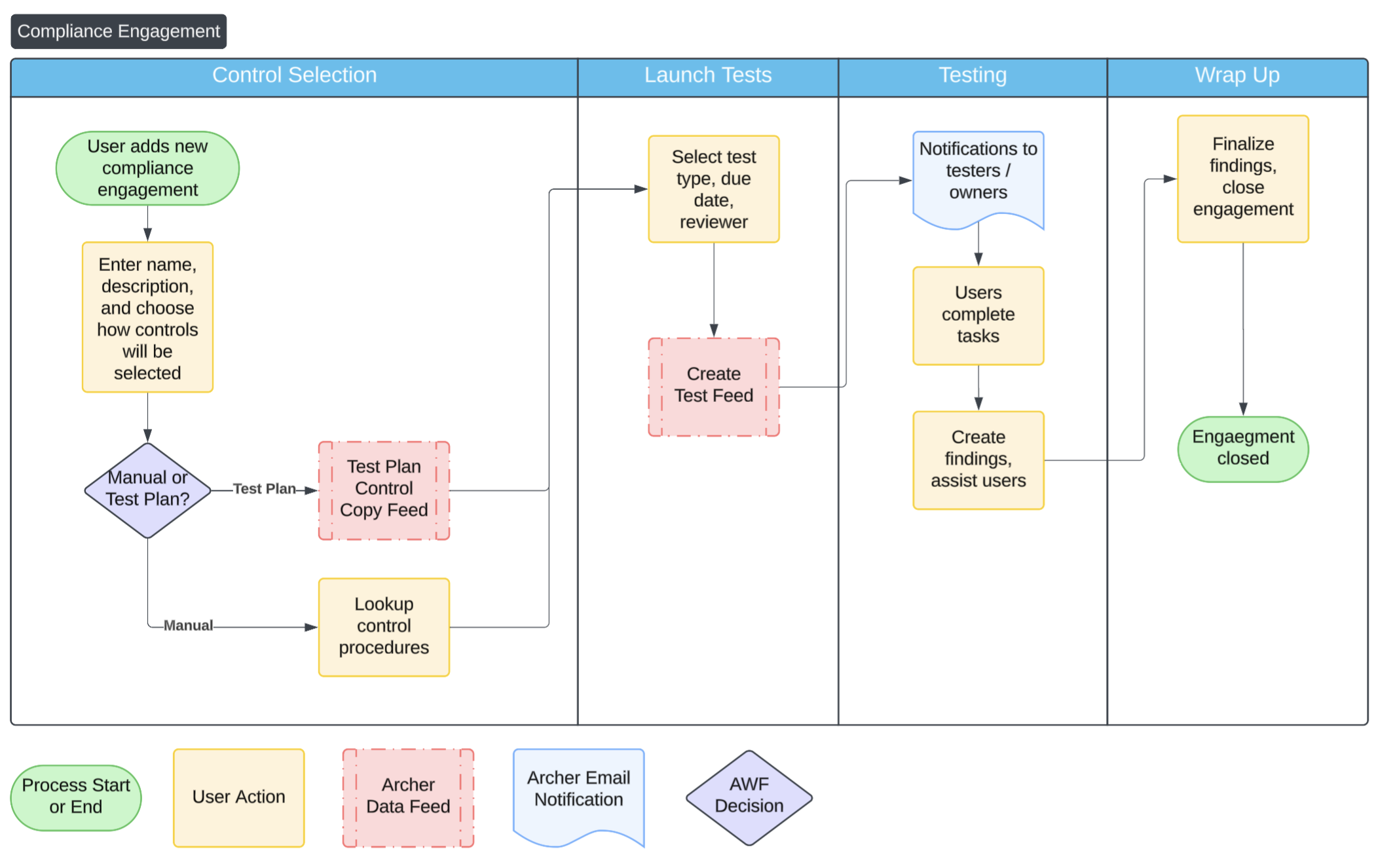
Compliance engagements allow you to launch multiple control tests or self-assessments at once. Engagements also streamline testing activities, ensure consistency, and provide centralized oversight of compliance efforts. The following diagram displays a flow of a compliance engagement.
Create a Compliance Engagement
-
From the menu, click
 and expand Compliance.
 -
Expand Controls Assurance and click the Compliance Engagements application.
-
Click Create New Record. Complete the engagement details, such as name and description.
-
Select if you want to manually select the controls or use an existing control test plan.
-
Click Complete Selection.
-
In the Test Generation section, determine the type of test, due date, and reviewer.
-
From the Actions menu, select Launch Tests to initiate testing across all selected controls.
-
A data feed runs your tests. You may need to refresh your screen after a minute to see the controls. All testers and assignees receive emails with results.
Create a Control Test Plan
A control test plan defines a set of related controls that are tested together. It ensures a structured and consistent approach to performing control tests and simplifies regular testing.
The following steps detail how to create a control test plan:
-
Navigate to the Control Test Plans application.
-
Click Create New Record.
-
Enter a name and description for the test plan.
-
Select relevant controls by adding related records or using a search filter.
-
Click Save.
Create a Policy
Policies are core governance documents that define expected behavior and standards. Creating clear, accessible policies ensures alignment with regulatory requirements and internal expectations.
The following steps detail how to create a policy:
-
Navigate to the Policies application.
-
Click Create New Record.
-
Enter the policy title and domain.
-
Enter the policy in the policy field, upload a policy document, or link to the managed document repository.
-
Click Save and route the policy for approval if needed.
Map Control Standards to Obligations
Mapping control standards to obligations helps demonstrate how your internal controls align with external requirements. This ensures traceability from regulations to internal practice.
The following steps detail how to map control standards to obligations:
-
Navigate to the Control Standards application.
-
Open a control standard.
-
In the Related Records section, click
 .
. -
Search for and select the relevant obligations.
-
Click Save.
Create a Control
Controls are the activities or safeguards in place that enforce policies and manage risk. Defining controls clearly allows for consistent testing and performance tracking.
The following steps detail how to create a control:
-
Navigate to the Controls application.
-
Click Create New Record.
-
Enter the control name, description, control type, frequency, and owner.
-
Link the control to relevant Control Standards, Obligations, and Risks.
-
Define applicable business processes or assets.
-
Click Save.
Test a Single Control
Individual control testing ensures that specific controls are functioning as intended. It’s critical for ongoing assurance and audit readiness.
The following steps detail how to test a single control:
-
Open the Controls application and select the control to test.
-
In the testing application, add a new test by clicking the plus button on the control test or control self-assessment fields.
-
Fill in the test details, assign a user, and set a due date.
-
(Optional) Create an evidence record.
-
Enter observations and results.
-
Open issues as needed.
Collect Evidence From a User
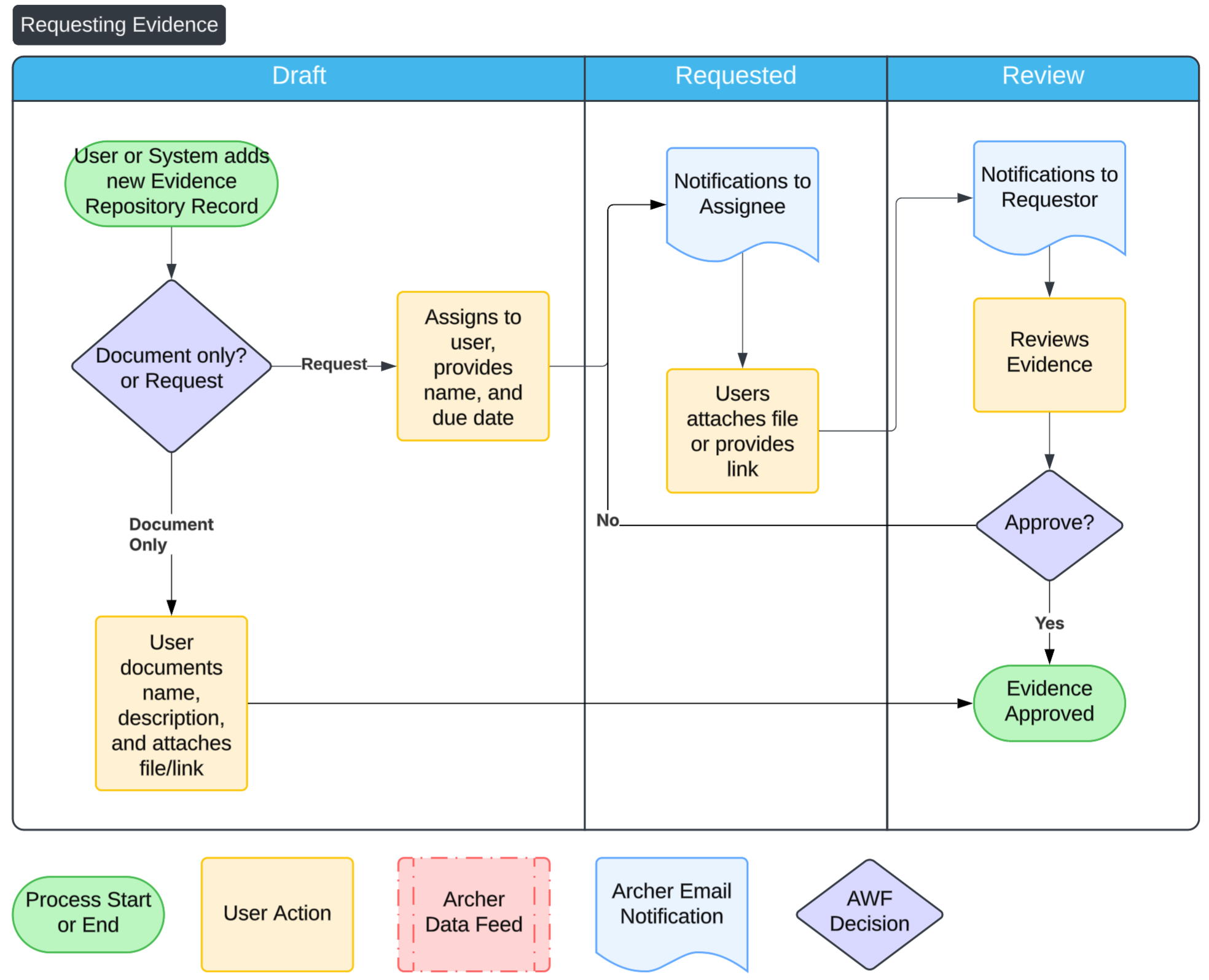
Collecting evidence supports audit readiness and demonstrates control effectiveness. It also helps maintain a record of operational compliance activities. Compliance Engagements automatically sends requests, but compliance managers can also send requests manually.
The following steps detail how to create collect evidence from a user:
-
Create a Evidence Repository record.
-
Assign a user, set a due date, and provide context in the request field. The user receives an email and can upload evidence directly into the record.
-
Review and confirm the evidence meets expectations before closing the request.
Best Practices
Archer’s Compliance solution is based on several authoritative sources.
-
COSO Internal Controls Framework (2013), which is the gold standard for designing and assessing internal control system.
-
COBIT, which focuses on IT controls and governance.
-
ISO 27001, which is a framework for managing information security risks and controls
It’s recommended that organizations align to these standards and use Archer to operationalize the processes. This section explains some best practices to consider to run a successful program.
Use control standards to map to obligations
Control standards should be thought of as "Common Controls" and should be the application that bridges obligations, policies, and controls. Link obligations to control standards and then map controls to standards. This structure simplifies reporting, shows control coverage, and supports cross-regulation alignment.
Create a control library
Maintain a centralized, well-structured library of controls that can be used across business areas. Control details should be standardized and easy to collect. Use the fields in the control library and assign owners to them.
Use fields like tags, categories, business units, processes, and linked obligations to ensure the control is easy to find, analyze, and report on across the system.
Specify required artifacts in each control record so business users and auditors know what to collect and provide during testing.
When creating a control, define how its effectiveness will be measured. Include clear procedures, frequency, responsible parties, and expected outcomes to simplify future testing.
Test controls regularly
Establish a control testing calendar based on risk and regulatory requirements. Prioritize high-risk areas and ensure coverage over time without overburdening resources. Key operational controls or controls specific to regulations should be assessed annually.
Use Control Self-Assessments (CSAs) for regular, business-led reviews, and Control Tests for independent testing. Combining both improves assurance and coverage.
Use compliance engagements for proper workflow
Leverage compliance engagements to launch controls in bulk and automatically send out evidence requests. Compliance engagements lead compliance managers through a structured workflow that includes control selection, planning, testing, issue identification, and reporting.
To better organize testing, use control test plans. A control test plan is a way to easily bundle controls for any reason, such as by regulation, cycle, or area. When you create a compliance engagement, instead of selecting the controls manually, you can just select the Control Test Plan. This ensures consistency, accountability, and easy tracking.
Document obligations across the business
Obligations can come from regulations, but may also come from your internal policies, contracts, or system requirements. Split high-level documents into manageable, actionable obligations. Properly source where the obligation comes from to ensure accurate control mapping and easier compliance tracking.
Frequently Asked Questions
What data should I have in place before I get started?
The resilience use case relies heavily on your “enterprise assets”, or applications that will be used in the dependency mapping. At the very minimum, you need your business process library ready to go in order to launch Business impact analysis, but we recommend you also populate applications like: facilities, applications, third parties, etc. in order to map those in during the BIA process.
| Application | Format |
Priority |
|---|---|---|
|
Business Unit |
A list of organizational units with owners |
Required |
|
Controls |
A list of control procedures performed by the company |
Required |
|
Policies |
A list of policies tracked by the company |
Recommended |
|
Control Standards |
A list of common controls, or high level controls that can map to regulations |
Recommended |
|
Authoritative Sources |
A list of regulations that need be adhered to |
Recommended |
Can I change the questions on the procedures?
Yes. You can make changes to questions to meet your business needs. Changing the values lists of results and adding additional questions can make this application better align with your program.
If we are not ready for control tests, is there a way to still mark the effectiveness of the controls?
Yes. Navigate to the controls application as an admin, then modify Control Effectiveness Rating to be a manually-set field. This allows users to select the control effectiveness right on the control, simplifying the process.
You may also want to remove the full control tests from the layout and related testing fields. Additionally, you can make Control Effectiveness Rating a private field and assign users and groups access to it.
Should I use sub-obligations?
Sub-obligations are optional applications. Evolv Compliance uses sub-obligations to distinguish larger, thematic obligations from the actual text extracted from regulations. If you don't license Evolv Compliance, you don't need to use this application, but you may benefit from the structure of having a parent and child requirement. All calculations consider both sub-obligations and obligations, so using both is acceptable.
Generally, if an obligation contains multiple independent requirements, create sub-obligations. If the obligation has simple, single-sentence requirements, map controls directly at the obligation level.