IT Security Risk Management Solution
The Archer IT Security Risk Management solution provides a structured approach to documenting information systems, assessing the impact and likelihood of compromise, managing control gaps, and monitoring the ongoing security posture of your IT environment. This solution is an update to the Information Security Management System (ISMS).
This solution focuses on GRC-aligned IT risk management. It is designed to help organizations understand the risk posture of their information systems — not to replace vulnerability scanners, SIEMs, or ticketing systems. Archer can consume data from those tools to support the GRC process.
This solution is part of Archer Core Solutions.
For information on the latest changes to the solution, see the Release Notes.
Key Components
Solution Architecture
The following diagram shows the relationships between the applications in the solution.
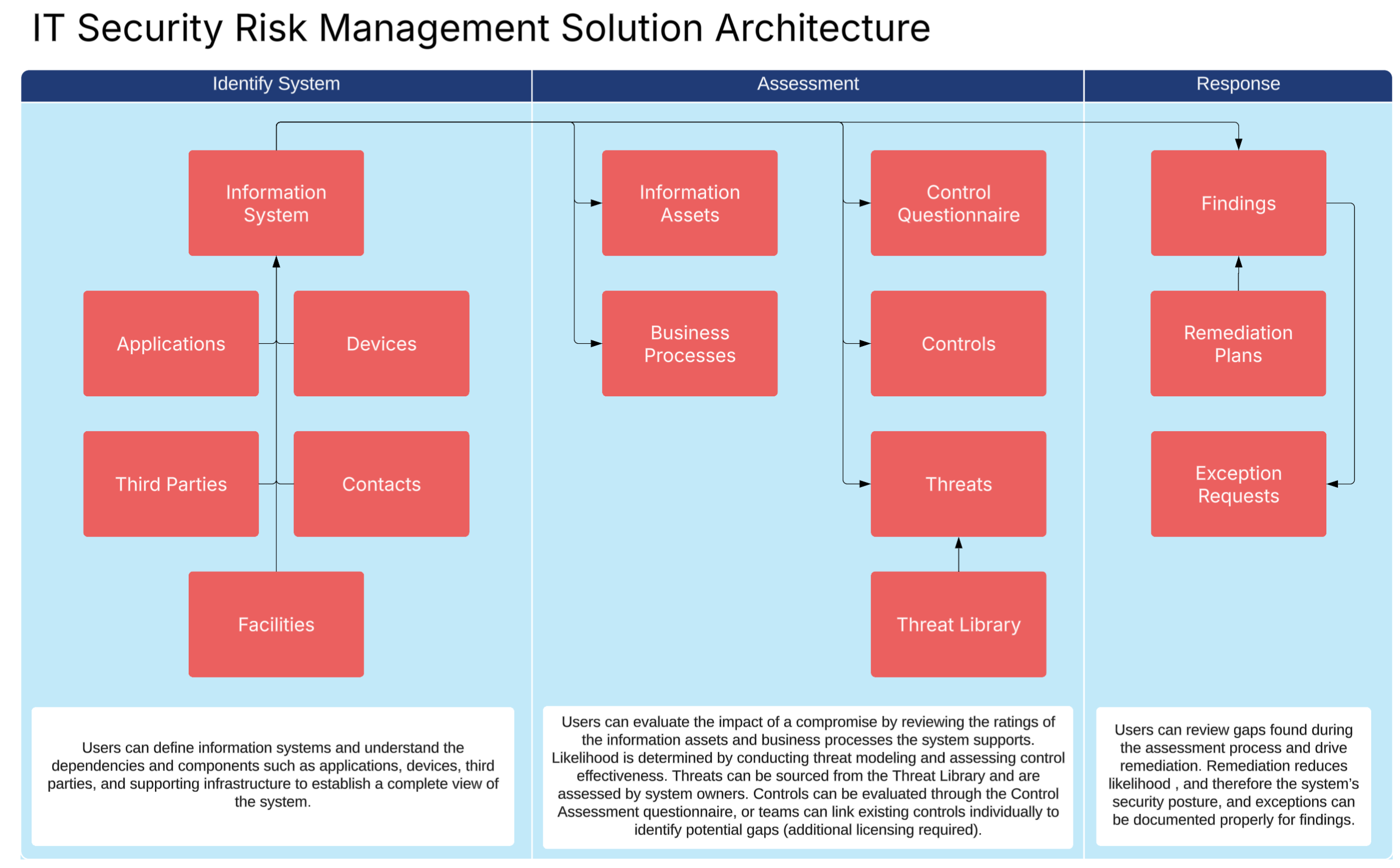
Core Applications
| Applications | Description |
|---|---|
| Information System | The central record of the solution. Represents a bundle of software, hardware, data, processes, and people that together perform a business function. Each system record drives the impact assessment, gap analysis, and ongoing monitoring workflows. |
| Applications (Software) | Captures the software components associated with an information system. Linked to the information system to establish what software is in scope for assessment. |
| Devices (Hardware) | Documents the hardware assets associated with an information system. Linked to the information system to provide a full picture of the technical environment. |
| Information Assets | Stores the data assets processed or stored by an information system. Rated using the CIA triad (Confidentiality, Integrity, and Availability) to drive the system's impact score. |
| Business Processes | Documents the business or IT processes that the information system supports. Can be linked to Business Impact Analysis (BIA) results when the Resilience Management solution is licensed. |
| Contacts | Captures the people — owners, administrators, and other stakeholders — associated with an information system. |
| Findings | Captures control gaps, vulnerabilities, assessment results, and other issues that affect the likelihood of a system being compromised. Findings can originate from questionnaires, control testing, continuous control monitoring, penetration tests, or other sources. Linked to the Issues Management solution for remediation tracking. |
| Control Assessments | Documents the results of evaluating a control or set of controls tied to an information system. Used to calculate control strength as an input to the likelihood score. |
Access Groups
| Group Name | Description |
|---|---|
|
IT Security Risk Management |
Provides full administrative access to all IT Security Risk Management applications. Users in this group can create and manage information systems, run assessments, review findings, and approve risk decisions. |
|
IT Security Risk User |
Provides limited access to IT Security Risk Management applications. Users in this group can own and assess information systems, submit findings, and provide status updates on remediation activity. |
Data Feeds (Automations)
| Data Feed | Description |
|---|---|
| DF.IT.AWF.01.01 Create Threats from Library | This feed will copy records from the Threat Library into the Threat and associate those threats to the Information System. This is triggered by users from the Information System record when they hit the AWF button "Generate Threats" |
Dashboards
| Dashboard | Description |
|---|---|
| IT Security Risk Management Dashboard | Provides a portfolio view of IT security risk across all systems. This is meant for security and risk leadership, ITSRM program managers, and security analysts. It explains the risk of the IT environment overall, which systems need reassessment, and how the program is performing overall. |
| Information System Owner Dashboard | Shows the users systems they own or are assigned to, what's expected of them, and what's outstanding. This is meant for system owners, administrators, and finding owners. It explains which systems you own, what you need to do, and what's overdue. |
Workflow Overview
This section provides step-by-step guidance for key IT Security Risk workflows in Archer.
Overall, this solution is meant to help teams know what systems they have, assess the impact and likelihood of a system being compromised, and set up and test safeguards. The solution also supports remediation and risk acceptance as well as helps with ongoing monitoring of the security posture of the system. Below is a diagram to show the end to end flow.
Documenting an Information System
An information system is the core record in this solution. It represents a bundle of applications, devices, information assets, processes, and contacts that together perform a business or IT function. Accurate system documentation is the foundation for all downstream risk assessments. Below are the steps:
-
Create the information system record
-
Navigate to the Information Systems application and click Add New.
-
Enter the system name and a description that explains its purpose and scope.
-
Assign a System Owner and a System Reviewer.
-
Select the System Classification (for example: internal, customer-facing, regulated).
-
-
Add dependencies
-
In the section of system tab of the record, review the different options of dependencies, like applications, devices, etc. Click Add New or link to existing records.
-
-
Add information assets
-
In the Information Assets section, click Add New or link to existing information asset records.
-
On the information asset record, you can navigate to the "Risk Management" tab to assess Confidentiality, Integrity, and Availability (CIA) ratings based on the sensitivity and criticality of the data.
-
Click Save. The system's impact score updates automatically based on the ratings provided.
-
-
Link processes
-
In the Processes section, link any business or IT processes the system supports.
-
If the Resilience Management solution is licensed, BIA results are available to inform process criticality ratings.
-
Performing an Impact Assessment
The impact assessment determines how damaging it would be if the information system were compromised. Impact is calculated from two main factors: the ratings of the information assets linked to the system (Data Sensitivity), and the criticality of the business processes it supports (Business Criticality). Below are the steps:
-
Navigate to the Impact Assessment Tab and review the reports showing
-
Confirm the information asset ratings
-
Confirm all information asset are accounted for
-
Review the CIA Ratings for each information assets and make changes or additions as needed
-
Click save on the information system to have it recalculate the data sensitivity ratings.
-
-
Review the Process Criticality (If Applicable)
-
If the Resilience Management solution is licensed, open the Processes section and confirm the BIA-derived criticality ratings is set for process.
-
If BIA results are not available, use the resilience management guide to launch and complete BIAs for the processes.
-
Determine Likelihood and Conduct Gap Analysis
The likelihood of compromise is determined by conducting threat modeling and evaluating gaps, weaknesses, and control failures associated with the information system.
Threat Modeling is a process in which the user can identify, analyze and mitigate potential security threats before they can be exploited. The output of the threat modeling exercise is to understand the level of threats against the system. High threat environments will increase the likelihood of compromise.
Gaps are logged in the Findings application. Findings can come from multiple sources, including our Control Assessment questionnaire, control testing, continuous control monitoring, and penetration tests. More findings result in a higher likelihood score.
Threat Modeling
Threat modeling is a structured method for identifying how an attacker could compromise a system, and using that analysis to prioritize defensive measures before vulnerabilities are exploited.
There are several frameworks and methodologies that are commonly used by Security Managers. Archer does not require a specific framework. Each framework brings a different lens to the assessment, and many organizations use more than one. Different frameworks, however, may be applied differently. For example, STRIDE is a categorization framework which could be added to the Threat Library in Archer, while DREAD is a scoring framework, which could dictate the assessment of each threat.
Archer has native capabilities to work with existing threat modeling techniques, and administrators can further configure Archer to apply their preferred frameworks.
So regardless of the use of specific frameworks, the process for threat modeling is as follows:
-
Define Scope. In Archer, this is done by creating an information system, filling out the general details like the description and goals, applications, devices, and processes, as well as the ownership of the system.
-
Diagram the System. Archer permits users to attach data flow diagrams (DFDs) as well as network architecture diagrams right onto the information system. Typically organizations use tools like Visio, Lucidchart, or Draw.io to create these diagrams that visualize the components and the data flows between those components. These visualizations expose areas where attacks may occur, and trust boundaries. These diagrams should be used while identifying threats.
-
Identify Threats. Archer contains a Threat Library application that is filled with pre-populated threats from leading standards. When assessing a system, the system owner can click on the threats they want to assess, and a threat record will be copied and mapped to the system. Additionally, users can manually identify threats right in Archer.
-
Analyze Threats. Archer contains questions for each threat identified, focusing on how the threat manifests in the current system, the likelihood of occurence, impacted CIA pillars, and any other factors needed to understand the threat.
-
Design Mitigations. Each threat record in Archer can be mapped to controls. Alternatively, the user can write in a description of their mitigation, or log a finding to implement a security measure.
-
Review and Iterate. These threat records will stay active and can be reassessed when the Information System goes through future assessments.
For more information about applying different threat modeling techniques and frameworks, see the frequently asked questions section.
To do threat modeling in Archer, follow these steps:
-
Navigate to the Threat and Controls tab
-
Create and add a data flow diagram using the attachment field
-
Add threats to the Information System by clicking lookup in the threat library cross reference, then selecting the threats you want to assess. Once the threat library records are set, use the blue action button to "Generate Threats". Archer will create one threat record for each library record selected. Additionally, the user can manually add threats.
-
Go through each threat and complete the assessment.
Control Analysis
Understanding your control environment is critical to understanding your ability to mitigate threats, as well as identify vulnerabilities of your systems. For organizations that just own IT Security Risk Management, Archer provides a control questionnaire within the solution that can be used to determine overall control strength. This questionnaire is based on controls provided in NIST SP 800-171. Organizations that own the compliance solution can alternatively document specific controls and then use the compliance management solution to run compliance engagements and test those controls.
To automate control analysis, organizations can also look into continuous monitoring tools as well, and use the ITSRM Integration guide to use this data, rather than relying upon manual questionnaires and control assessments.
Regardless of the method used, the purpose of control analysis is to see if the right controls are in place, how effective they are implemented, and to identify gaps, or findings, that need to be reviewed. To complete this step in Archer, follow the following steps:
-
Navigate to the Threats and Controls tab on the Information System record.
-
Scroll down to the Controls section
-
Use one or more of the following options to identify gaps
-
Create and complete the ITSRM Control Assessment. Launch the questionnaire, answer each control question, and submit. Findings are generated automatically for any responses that indicate a gap.
-
Add and test controls. Link existing controls to the information system and run control tests. Findings are generated automatically from failed test results.
-
Add findings manually. Add new findings directly when gaps are identified through penetration tests, audit findings, regulatory examinations, or other sources.
-
Managing Findings
Once findings are identified, each one follows a clear path to either remediation or risk acceptance. Remediating findings reduces likelihood and lowers the overall risk rating of the system. Steps to manage findings:
-
Click on finding
-
Respond to the finding by choosing one of the following responses:
-
Remediate - will force the user to create one or more remediation plans. The finding owner is responsible for executing the plan once it gets approved.
-
Accept Risk - will force the user to create an exception request, which needs to be reviewed by a business manager before going into effect.
-
-
Track progress of the remediation plans or exception requests.
Monitor the system
Review the Ongoing Monitoring tab.
-
Open the information system record and navigate to the Ongoing Monitoring tab.
-
Review open findings, recent control assessment results, and any active exception requests.
-
-
Review data surfaced from integrated tools (such as vulnerability scanners or continuous control monitoring platforms) if integrations are configured.
-
Review dashboards.
-
Navigate to the IT Security Risk Management dashboards to see a portfolio view across all systems.
-
Key metrics include systems by risk rating, open findings by severity, and findings past due.
-
-
Trigger a reassessment.
-
To reassess a system manually, open the information system record and click Reassess.
-
An email notification is sent to the system owner to initiate the updated impact and gap analysis.
-
Reassessments update the impact score, likelihood score, and residual risk rating when complete.
-
Best Practices
Archer’s ITSRM solution is based on several authoritative sources.
- NIST Cybersecurity Framework 2.0, which outlines the core functions and outcomes that effective cybersecurity programs should achieve.
- NIST SP 800-30, a guide for conducting risk assessments. It defines threat sources and threat events, assessment methodologies, and categories for impact and likelihood used to evaluate the risk of system compromise.
- NIST SP 800-37, the Risk Management Framework (RMF) for information systems and organizations, which provides a structured lifecycle for categorizing systems, selecting and implementing controls, and authorizing systems for operation.
- Microsoft STRIDE, a threat modeling taxonomy that categorizes threats into Spoofing, Tampering, Repudiation, Information Disclosure, Denial of Service, and Elevation of Privilege. STRIDE is a well-established starting point for threat modeling on information systems.
- MITRE ATT&CK®, a globally accessible knowledge base of adversary tactics and techniques based on real-world observations. ATT&CK is used to inform threat modeling, detection engineering, and control coverage. Visit attack.mitre.org for more information.
- OWASP Top 10, the most widely referenced list of critical web application security risks, published by the Open Worldwide Application Security Project under a Creative Commons Attribution-ShareAlike (CC BY-SA) license.
- ISO/IEC 27001, the international standard for information security management systems (ISMS), which provides a framework for establishing, implementing, maintaining, and continually improving an organization's information security posture.
It’s recommended that organizations align to these standards and use Archer to operationalize the processes. This section contains some best practices to consider to run a successful IT Risk program.
Start with your highest-risk systems
When rolling out the solution, prioritize documenting information systems that handle regulated data, support critical business processes, or have known control weaknesses. A well-documented high-risk system provides more immediate value than a complete inventory of low-risk ones.
Expand your IT GRC tool by utilizing other core solutions
Archer has solutions for all the most critical needs of organizations to manage their risks and comply with standards and regulations.
Archer Risk Management solution allows users to build out their risk register and map them to controls. It also allows users to document KRIs and KPIs, which can tie to systems.
Archer Compliance Management enables IT teams to document controls, gather evidence, and collect controls. It also helps manage policies and regulatory obligations.
Archer Resilience Management enables IT teams to document business processes and conduct business impact analyses, create and review IT Disaster Recovery plans that can be associated to the informaiton systems. It also has an incident management workflow that can be used to track incidents live and collaborate with team members.
Archer Third-Party Risk Management enables IT teams to document their suppliers in a single repository, assess the risk of engagements with supplliers, and conduct due diligence and ongoing monitoring.
Archer Audit Management enables organizations to conduct independent review of risks and controls, and can integrate well with the data used by second-line risk teams in Archer.
Centralize Findings in Archer
Findings from penetration tests, control assessments, questionnaires, and other sources should all be documented in the Findings application. Centralizing findings in Archer gives risk and security teams a single view of the gaps affecting each system and prevents issues from being lost in disconnected tools.
Use Integrations to reduce manual data entry to to keep data live
The Ongoing Monitoring tab is designed to surface data from integrated tools. Work with your Archer administrator to configure integrations with vulnerability scanners, continuous control monitoring platforms, or other security tools so that key findings and metrics flow into Archer automatically rather than requiring manual entry.
Frequently Asked Questions
What data should I have in place before I get started?
| Application | Format | Priority |
|---|---|---|
| Information Systems | A list of information systems with mapping to devices and applications | Recommended |
| Processes | A list of processes conducted on a regular basis by the organization. | Recommended |
| Devices | A list of hardware components used by the business | Recommended |
| Applications | A list of software used by the business. | Recommended |
|
Business Unit |
A list of organizational units with owners |
Required |
Can findings be created automatically from integrated tools?
Yes. Archer's API and data integration capabilities allow findings to be created programmatically from external sources such as vulnerability scanners or continuous monitoring platforms. This allows Archer to serve as the GRC record of significant findings while the originating tool continues to operate independently.
Can different teams manage their own systems without seeing others?
Yes. Archer's record-level permissions allow visibility and edit access to be restricted by business unit, division, or system owner. This enables multiple teams to use the solution independently within the same platform while maintaining appropriate separation of data.
How can I incorporate different threat modeling frameworks?
Archer is framework-agnostic. The Threat Library and Threats applications can support virtually any threat modeling methodology with minimal configuration. Some frameworks are about categorizing threats (and slot directly into the Threat Library), while others are about scoring or analyzing threats (and require additions to the Threats form). The table below summarizes how each common framework maps to Archer.
| Framework | Description | How to Apply in Archer |
|---|---|---|
| STRIDE | Developed by Microsoft, STRIDE is a threat categorization framework that groups threats into six types: Spoofing, Tampering, Repudiation, Information Disclosure, Denial of Service, and Elevation of Privilege. It is one of the most widely used frameworks for threat modeling. https://learn.microsoft.com/en-us/azure/security/develop/threat-modeling-tool-threats | Add six records to the Threat Library, one for each STRIDE category, with Framework set to "STRIDE." On an Information System's Threat Modeling tab, system owners select all six and generate the corresponding Threat records to assess each category against the system. |
| DREAD | Originally developed at Microsoft, DREAD is a threat scoring framework rather than a categorization framework. It rates each identified threat across five dimensions: Damage Potential, Reproducibility, Exploitability, Affected Users, and Discoverability. The scores are combined to produce a quantitative threat rating. https://en.wikipedia.org/wiki/DREAD_(risk_assessment_model) | DREAD is applied at the Threat application level, not the Threat Library. Add five values list fields to the Threats form (Damage Potential, Reproducibility, Exploitability, Affected Users, Discoverability) with a 0-10 rating scale, plus a calculated DREAD Score field that sums or averages them. Use DREAD alongside another categorization framework like STRIDE. STRIDE identifies what threats exist, DREAD scores how severe they are. |
| PASTA | Process for Attack Simulation and Threat Analysis is a seven-stage, risk-centric methodology that ties technical threats to business impact. The stages are: Define Objectives, Define Technical Scope, Application Decomposition, Threat Analysis, Vulnerability Analysis, Attack Modeling, and Risk and Impact Analysis. PASTA is heavier weight than STRIDE and is best suited to mature security programs. https://owasp.org/www-pdf-archive/AppSecEU2012_PASTA.pdf | PASTA is more methodology than catalog, so most of it is process work done outside Archer. The Threat Analysis and Attack Modeling outputs are captured in the Threat Library and Threat as usual. The earlier stages (Objectives, Technical Scope, Decomposition) are documented on the Information System record itself — use the description, applications, devices, and data flow diagram fields on the Impact Assessment and System tabs. The Risk and Impact Analysis stage uses the existing residual likelihood and treatment decision fields on the Threats application. |
| Trike | Trike is a risk-centric threat modeling framework that focuses on actor-action matrices and acceptable risk levels. It defines threats based on who can perform what action against an asset, and assesses each based on the organization's risk appetite. https://www.octotrike.org/ | Trike's actor-action matrix maps cleanly to existing Archer fields. Use the Threat Actor field on the Threat application to capture the "actor" side, and Attack Scenario to capture the "action" side. Trike's acceptable-risk evaluation is handled by comparing residual likelihood to the organization's documented risk appetite (configured in the Risk Hierarchy or Risk Appetite applications). No new fields required. |
| VAST | Visual, Agile, and Simple Threat modeling was designed for enterprise scale and integration with agile development. It distinguishes between application threat models (focused on software architecture) and operational threat models (focused on infrastructure and process). https://www.threatmodeler.com/vast-methodology-agile-threat-modeling/ | VAST's two-model approach is supported by adding a "Threat Model Type" values list field to the Threats application (Application / Operational). Filter and report on threats by type to maintain separate views. VAST's emphasis on automation and process integration is a methodology choice; the underlying threat data still lives in the Threat Library and Register. |
| Attack Tree | Attack trees are a hierarchical method of representing how an attacker can achieve a goal. The root node is the attacker's objective; child nodes are sub-goals or steps required to achieve the parent goal. Branches can use AND/OR logic to indicate whether all steps or any one step is required. https://www.schneier.com/academic/archives/1999/12/attack_trees.html | Attack trees are best documented as a diagram attached to the Information System or Threat record (using tools like Visio, Lucidchart, or Draw.io), then captured in Archer as parent and child threat records. Add a "Parent Threat" cross-reference field on the Threat record that points back to itself, allowing users to build hierarchical threat relationships. The root threat captures the attacker's overall objective; child threats represent the steps. |
| CVSS | The Common Vulnerability Scoring System is a standardized vulnerability scoring framework maintained by FIRST. It produces a 0-10 severity score based on Base, Temporal, and Environmental metrics. CVSS scores vulnerabilities, not threats directly, but is often used to rate the severity of threats that exploit known vulnerabilities. https://www.first.org/cvss/ | CVSS is best applied at the Threat level when a threat ties to a known CVE. Add a CVSS Score field (numeric, 0-10) and optionally a CVSS Vector String field (text) to the Threat. For organizations that integrate vulnerability scanning into Archer, the CVSS score can be inherited via cross-reference from a Vulnerabilities application. |
| T-MAP | Threat Modeling based on Attacking Path analysis quantifies the security risk of commercial off-the-shelf (COTS) systems by analyzing attack paths and assigning weights based on attack feasibility and business impact. It is most often used in enterprise IT environments with significant COTS dependencies. https://link.springer.com/chapter/10.1007/978-0-387-39656-2_2 | T-MAP applies to systems with documented attack paths and COTS components. The attack path itself can be captured in the Attack Scenario and Preconditions fields on the Threat. For T-MAP's quantitative weighting, add an "Attack Path Weight" numeric field and an "Attack Path Description" text field to the Threat. Cross-reference to the Applications/Devices applications to track COTS components involved in each attack path. |
| MITRE ATT&CK | MITRE ATT&CK is a globally accessible knowledge base of real-world adversary tactics and techniques, organized into matrices for Enterprise, Mobile, ICS, and Cloud environments. The Enterprise matrix contains 14 tactics (the adversary's goals) and hundreds of techniques (the methods used to achieve them). https://attack.mitre.org/ | Similar to STRIDE, ATT&CK is implemented through the Threat Library. Add records for each ATT&CK tactic (or technique, for more granular modeling) with Framework set to "MITRE ATT&CK" and Framework Component set to the tactic name. System owners can then select relevant tactics or techniques on the Threat Modeling tab and assess each against their system. ATT&CK can be used alongside STRIDE, for example, using STRIDE for high-level categories, ATT&CK for specific adversary behaviors. |
A note on combining frameworks
Most mature threat modeling programs do not pick a single framework. Common combinations include:
- STRIDE + DREAD — STRIDE identifies what threats exist; DREAD scores how severe each one is
- STRIDE + MITRE ATT&CK — STRIDE for high-level categorization, ATT&CK for specific adversary techniques relevant to mature security programs
- PASTA + CVSS — PASTA provides the structured methodology; CVSS quantifies vulnerability-driven threats
Archer supports all of these combinations natively. The Framework field on the Threat Library allows multiple frameworks to coexist, and frameworks that add scoring (DREAD, CVSS, T-MAP) can be implemented as additional fields on the Threat without conflicting with categorization frameworks.