Archer Third-Party Risk Management Solution
Archer Third-Party Risk Management offers a prescriptive framework for onboarding, assessing, and monitoring vendors throughout their lifecycle.
This solution is part of Archer Core Solutions.
For information on the latest changes to the solution, see the Release Notes.
On this page
Key Components
Solution Architecture
The following diagram shows the relationships between the applications in the solution.
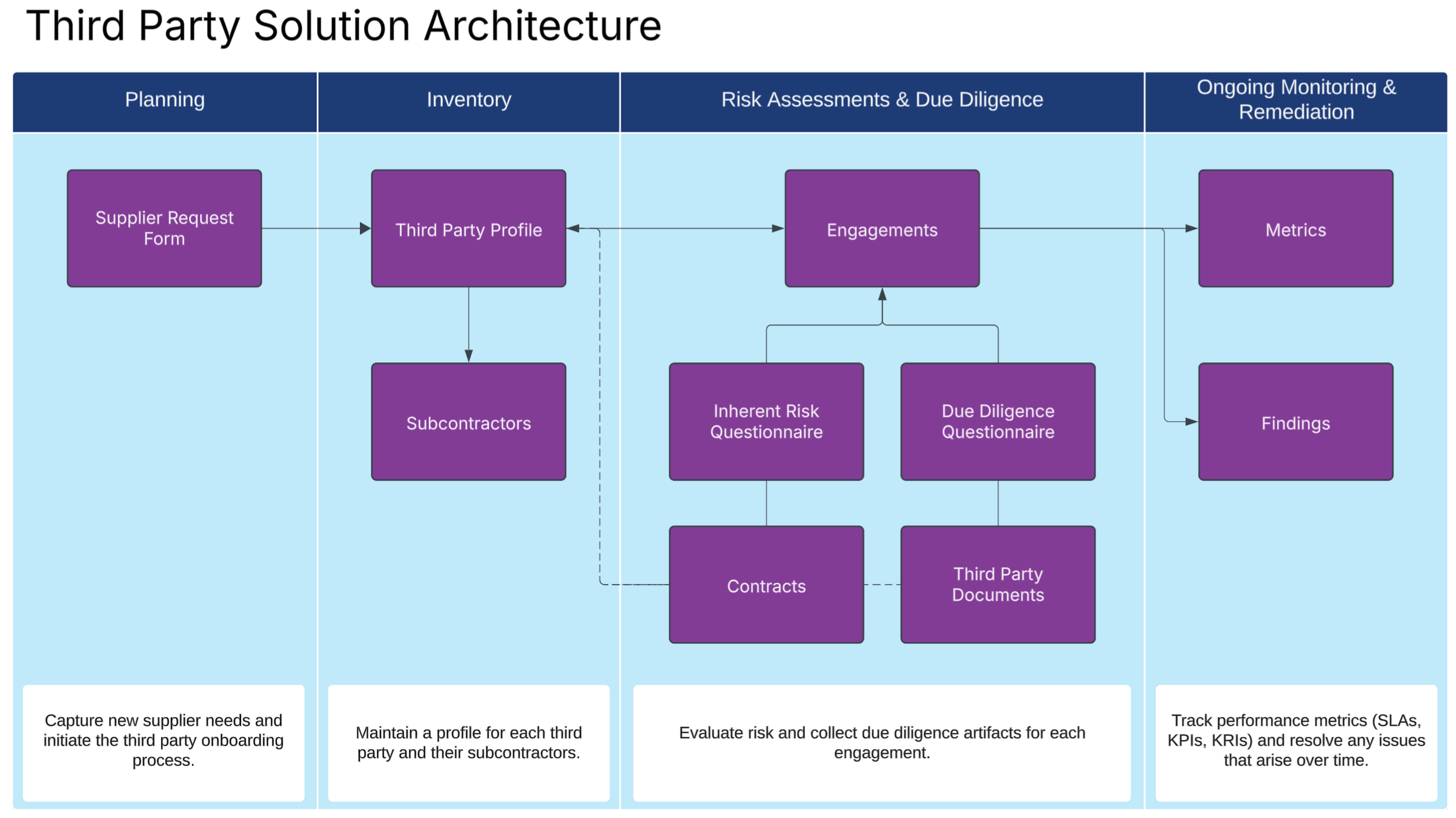
Core Applications
| Applications | Description |
|---|---|
|
Third Party Profile |
Third-Party Risk Management starts with cataloging your vendors in one central repository. The Third Party Profile is the inventory that contains information about the vendor, their location, and any financial risks. Assessments that are done at the engagement level are included in this application. |
|
Engagements |
Engagements live under the third party profile and describe engagement with a third party. All of the risk assessments, due diligence, and ongoing monitoring happens on the engagement level. |
|
Supplier Request Form |
Supplier Request Forms are a way for business users to request services from third parties. They ask for basic information about needs so the third party team can intake third parties, understand the needs of the business, and act as consultants. |
|
Third-Party Documents |
During due diligence, you may need to collect evidence, artifacts, or other documents. Third Party Documents is the repository for all of these attachments. It enables you to request your third party contacts for documents and track expiration dates. |
|
Subcontractors |
During due diligence, you may find that you need to identify their critical vendors, or subcontractors, that may affect their services. This application is where you can identify those critical subcontractors as needed. |
|
Contracts |
Tracking contracts is a key part of the third party risk management process. The Contracts application allows you to track contract workflow, determine review cycles, and track expiration dates and key risks. |
|
Due Diligence Checklist |
The Due Diligence Checklist allows you to select the types of due diligence activities that need to be conducted for an engagement. These checklists can be reused or made as needed in an engagement. |
|
TPRM - Inherent Risk Questionnaire |
This internal questionnaire is performed at the beginning of an engagement. Its goal is to understand the inherent risk of the engagement itself. The questionnaire can be sent to the relationship owner or the TPRM analyst. It covers 8 areas of risk and can be configured by the organization. |
|
Due Diligence Questionnaire (DDQ) |
This questionnaire is sent to a third party to assess their control effectiveness and security measures. The answers from this questionnaire and the third party documents determine the control effectiveness and residual risk of an engagement. |
Access Groups
| Group Name | Description |
|---|---|
|
Third Party Management |
Gives full admin access to all third party applications. |
|
Third Party User |
Gives limited access to all third party applications. Users in this group can own engagements, third parties, documents, and assessments. |
Data Feeds (Automations)
| Data Feed | Description |
|---|---|
|
DF.TP.AWF.01.01 Create Third Party Documents from Due Diligence Checklist |
This data feed runs when an engagement has a due diligence checklist and the user moves the stage to due diligence. It analyzes the due diligence checklist and creates one third party document record per selected checkbox. |
Dashboards
| Dashboard | Description |
|---|---|
|
Third Party Management Dashboard |
Provides a consolidated view of third parties, engagements, risk ratings, and open tasks that need to be completed. |
Workflow overview
This section provides step-by-step guidance for key third party workflows in Archer.
Running Third Party Risk Management
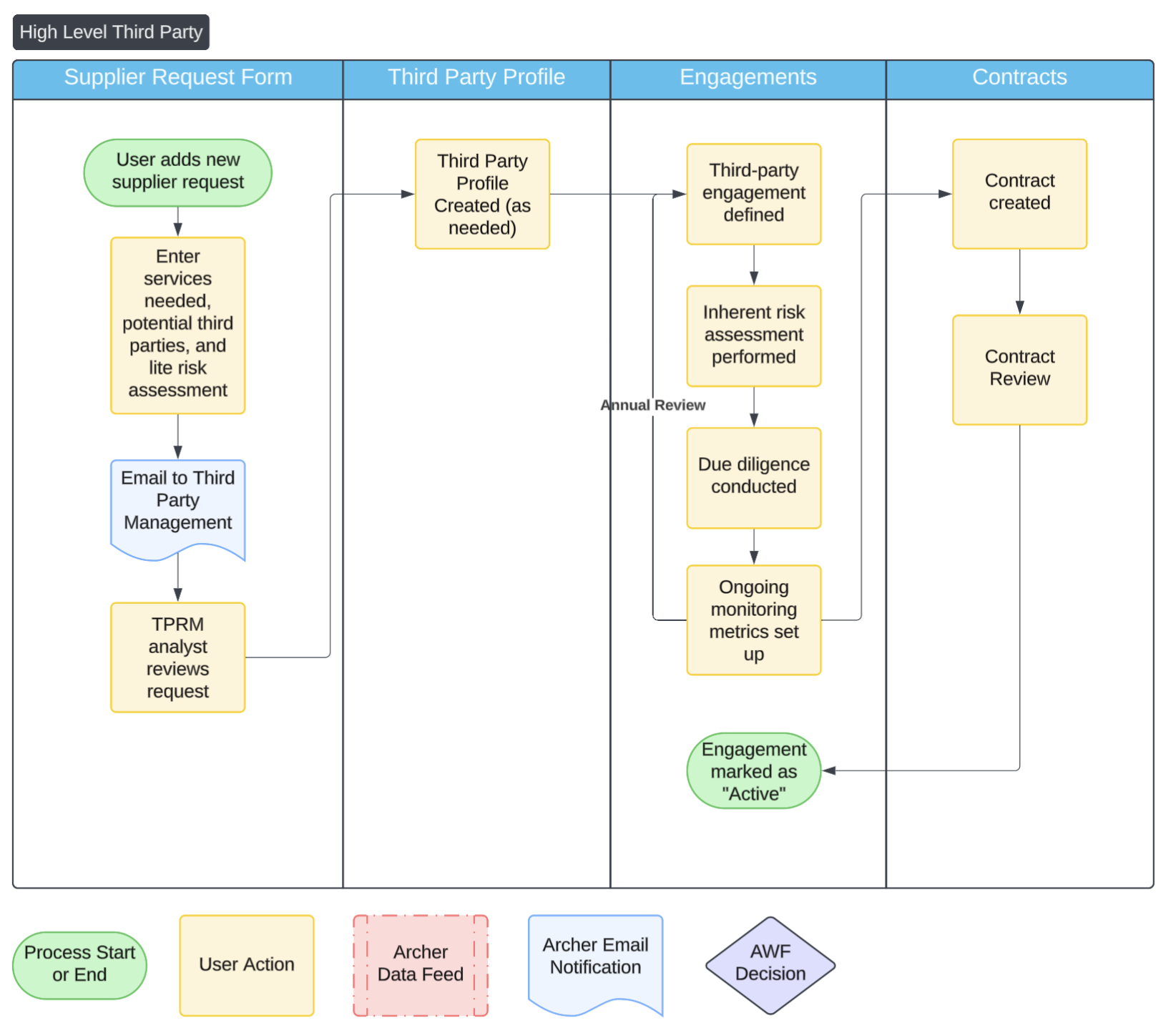
The following diagram shows how engagements are created in a normal flow.
-
A business user submits a supplier request form.
-
Vendors are added to the third party profile.
-
Create an engagement to conduct a TPRM assessment.
-
Complete the steps of the engagement to capture the inherent risk, complete due diligence, and determine a residual risk.
-
Contracts can be documented and reviewed over time.
Creating an Engagement
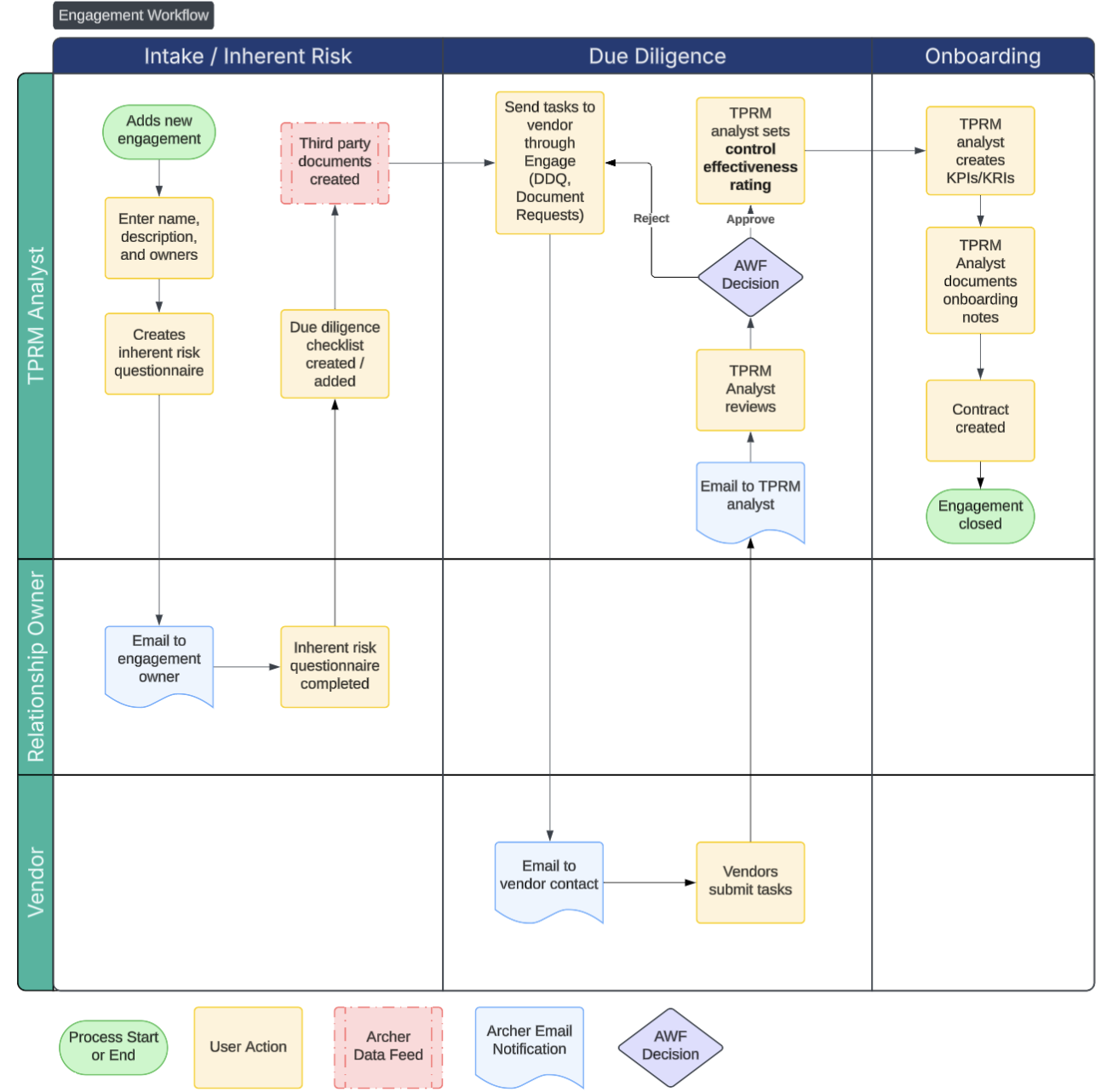
The following diagram shows how engagements are created.
-
Create a new record in the engagement application from the third party profile.
-
Complete all general details including the related processes, applications, and products and services.
-
Create an inherent risk questionnaire. By default, it's sent to the engagement or relationship owner.
-
Based on the risk score and the type of engagement, create or search for a due diligence checklist. The checklist is a list of tasks that need to be completed during the due diligence stage.
-
In the due diligence stage, send each task and assessment using Engage by accessing each record, selecting the contact, and clicking Send to Vendor.
-
Emails are sent to the vendors. Once they finish their tasks, emails are be sent to the TPRM analysts for review.
-
After review, TPRM analysts provide an overall control effectiveness rating which will mitigate the inherent risk to create a residual risk.
-
The user moves the engagement to onboarding.
-
In the onboarding stage, the user sets up metrics to be tracked on a regular basis. They also document details on the onboarding and add a contract record to track workflows.
-
The TPRM analyst moves the engagement into the active stage. In this stage, users can initiate an assessment again to review the inherent risk, add more due diligence tasks, and assess the residual risk.
Submitting a Supplier Request Form
Before a third party can be evaluated or onboarded, a request must be submitted to capture basic information and initiate the due diligence process. The Supplier Request Form allows business users to propose a new vendor, describe the intended use, and trigger the third-party risk workflow.
-
Navigate to the Supplier Request application and click Add New.
-
Enter the supplier name and provide a brief description of the services they provide.
-
Select the relevant business unit or team requesting the vendor.
-
Enter additional details:
-
Contact name
-
Anticipated contract start date
-
Criticality or sensitivity of the services
-
-
Click Submit Request to send the request for review and assessment.
Completing an Inherent Risk Assessment
An inherent risk assessment evaluates the risk posed by a third-party relationship before any controls or mitigations are considered. This assessment determines how much due diligence is required later in the engagement.
The following steps detail how to complete an inherent risk assessment:
-
Open the relevant Engagement record in the Engagements application.
-
Navigate to the Inherent Risk tab.
-
Click Add New to create a new Inherent Risk Assessment. The assessment is automatically assigned to the relationship owner.
-
As the Relationship Owner, answer all assessment questions related to data sensitivity, regulatory exposure, business criticality, and other risk factors. Responses generate a risk score or tier used to guide the due diligence process.
-
Click Submit to complete the assessment.
Requesting or Adding Documents from Third Parties
Third Party Documents is a repository for any artifacts, evidence, or documents from third parties that are needed in the risk management process. In the workflow, you can choose to request a document from the supplier, which sends a request through Archer Engage, or you can simply log a document you already collected.
During the engagement workflow, any items checked within the due diligence checklist automatically generate third party documents. Third party risk teams can manually request documents by simply creating a third-party document record.
The following steps detail how to request or add third party documents:
-
From the engagement, navigate to the Due Diligence tab and add a new third party document. Alternatively, use the left panel to navigate to the Third Party Document application and create new record.
-
Select one of the following:
-
Request Document. Requests are sent through Engage. Once the request details are completed, click Send to Vendor.
-
Document Only. Attach the file and fill in necessary details.
-
Sending a Due Diligence Questionnaire or Task to a Vendor
As part of the third-party onboarding or review process, you may need to collect due diligence information directly from the vendor. Archer allows you to send a questionnaire or task through the Engagements application to gather necessary evidence, such as security practices, compliance certifications, or risk controls. This ensures the vendor meets your organization’s risk and compliance standards before proceeding.
The following steps detail how to send a due diligence questionnaire or task to a vendor:
-
Navigate to the Engagements application and open the relevant third party record.
-
In the Due Diligence section, click Add New to create a new due diligence questionnaire.
-
Complete the required fields.
-
Click Send to Vendor. This sends a secure link to the selected contacts, allowing the vendor to access and complete the questionnaire or task.
-
You receive an email notification once the vendor submits their response. Review the questionnaire.
-
If you approve it, click Approve from the action menu item.
-
If you reject it, click Reject from the action menu item. Send the questionnaire to the vendor.
-
Reassessing an Engagement
Regular reassessments help ensure that third-party relationships remain appropriate for the level of risk they pose. Over time, the services provided, regulatory requirements, or risk exposure may change. It's important to revisit the engagement details, reassess inherent risk, and gather updated documentation as needed.
The following steps detail how to reassess an engagement:
-
Navigate to the Engagements application and open the record for a vendor.
-
At the top of the page, click Reassess. This creates a new Inherent Risk Questionnaire, allowing you to reevaluate the engagement’s risk level.
-
Complete the new inherent risk assessment based on the current nature of the relationship.
-
If needed, send additional due diligence questionnaires or documentation requests to the vendor by adding them under the Due Diligence section.
-
Review and edit engagement fields.
-
Click Save and proceed through your team’s normal review or approval process.
Adding a Contract to an Engagement
Contracts are a critical part of managing third-party relationships, defining expectations, responsibilities, and legal protections. Adding a contract from the Lifecycle Management tab allows you to document key details and track the status of the contract workflow tied to a third-party engagement.
The following steps detail how to add a contract to an engagement:
-
Open the relevant Engagement record in the Engagements application.
-
Navigate to the Lifecycle Management tab.
-
Click Add New Contract to begin documenting a new contract.
-
Enter key contract information.
-
Upload a copy of the signed document or link to its location in your contract repository.
-
Use the workflow to track the status.
-
Click Save to maintain a complete view of the engagement lifecycle.
Setting up a SLA, KPI, or KRI
Key Risk Indicators (KRIs) help monitor emerging risk trends by capturing data tied to a specific risk exposure. This process walks you through setting up a new KRI in Archer, defining how it will be measured, and automating the data collection process through system-generated tasks.
Set up a SLA, KPI, or KRI
-
Navigate to the Ongoing Monitoring tab in the Engagements section and add a new metric.
-
Enter a metric name and description.
-
(Optional) Provide collection instructions to guide the metric owner when entering results.
-
Under Metric Type, select Key Performance Indicator (KPI).
-
Choose the type of monitoring:
-
Numeric Threshold: Define specific numerical ranges for Red, Amber, and Green thresholds.
-
Qualitative Threshold: Provide written guidance for what Red, Amber, and Green mean.
-
-
Select the measurement frequency that determines how often the metric is updated.
-
(Optional) Use the Targets field to specify business units, processes, or controls the KRI relates to.
-
Select the Metric Owner responsible for entering results.
-
The Metric Reviewer (the Risk Management group by default) is notified when changes to the metrics are made and can approve them.
-
Do one of the following:
-
If Numeric Threshold is selected, enter Red and Amber threshold values when prompted. The system determines the correct direction of the thresholds automatically.
-
If Qualitative Threshold is selected, provide clear descriptions for what each threshold color (Red, Amber, Green) represent.
-
-
Under Generate Tasks Automatically, do one of the following:
-
Select Yes if you want Archer to create a recurring task for the metric owner to submit results based on the selected frequency.
-
Select No to update the metric manually or via API.
-
-
Click Save to finalize the record, then click Submit when you're ready to send it through the review process. Once approved, the metric moves to Active and begins generating result tasks if task automation was enabled.
Terminating a Vendor
When a third-party relationship is no longer needed or it has become too risky to maintain, it’s important to document the termination strategy and formally update the engagement record. Archer’s Lifecycle Management tab allows you to record the termination plan, capture key details, and update the status of the vendor for tracking and reporting purposes.
The following steps detail how to terminate a vendor:
-
Open the active Engagement for the vendor you plan to terminate.
-
Go to the Lifecycle Management tab and select Mark for Termination.
-
Complete the required fields to define the termination strategy.
-
Once the termination process is complete, update the Engagement Status to reflect that the vendor relationship has ended.
-
Save the record to finalize the termination.
Creating a Reusable Due Diligence Checklist
Due diligence checklists standardize what evidence or documentation is required from third parties based on the nature or risk level of the engagement. Creating reusable checklists ensures consistency across similar vendors and saves time during onboarding and reassessments.
The following steps detail how to create a reusable due diligence checklist:
-
Navigate to the Due Diligence Checklist application and click Add New.
-
Enter a name based on the engagement type the checklist applies to.
-
In the Required Artifacts section, list the documents or evidence the vendor must provide.
-
Indicate whether a due diligence questionnaire (DDQ) is required as part of this checklist.
-
(Optional) Include instructions or notes to guide users when applying this checklist during an engagement.
-
Click Save to make the checklist available for use in future third-party engagements.
Best Practices
Archer's solution is based on several authoritative sources.
-
The OCC Bulletin 2023-17, which outlines regulatory expectations for financial institutions.
-
NIST SP 800-161 Rev. 1, which provides cybersecurity specific guidance on third party risk management teams
It’s recommended that organizations align to these standards and use Archer to operationalize the processes. This section contains some best practices to consider to run a successful program.
Reassess engagements based on risk level
Engagements should be reassessed, as the relationship between client and vendor often shifts during the course of the relationship. For example, the vendor might add new features or the business might start using the product differently than originally intended. This might change the risk rating. Control inefficiencies or gaps might come up in newer audits. By not reassessing engagements, organizations put themselves at risk.
Document and track KPIs and KRIs
Documenting metrics that can be tracked at regular intervals is critical for ongoing maintenance. Examples of KRIs and KPIs are relationship values, meeting attendance, support ticket counts, and task completion percentages.
This can be done in Archer using the Key Indicator Management Use Case.
Third party tiering should dictate the level of due diligence
Not all third parties require a full assessment. Third parties should be ranked based on risk and criticality. The higher the tier, the more due diligence should be required and the more frequent reassessments should happen.
Tiering considers the impact of potential issues and the likelihood that something negative will occur. Impact can include elements like the amount of data the third party has access to, the complexity of legal requirements around the engagements, and the size of potential fines for non-compliance. Likelihood can include factors like amount of data access, nature of the relationship, use of subcontractors, report access, and amount of data processing done by the third party.
Determine risk tolerances and live by them
You should determine what an acceptable level of risk is for your organization. The goal of due diligence is to see if vendors controls mitigate the risk to the level of your risk tolerance or below the threshold you set. If the inherent risk is already within your tolerance, then you may not need to focus your efforts to due diligence.
Track corrective action plans for vendor gaps
When issues are identified, work with suppliers to identify corrective actions plans. Issues should be categorized so reporting is easy to understand. Identify which corrective action plans block partnership and which ones leave risk unmitigated. Corrective action plans should be agreed to by both the third party and the organization, including the timeline and effectiveness of the proposed plans.
Ensure assurance from third parties is transparent and reliable
When you are provided documentation by a third party, it should be reviewed to validate any issues or findings. It’s best if vendors provide their assurance in publicly available, widely adopted frameworks so that their controls can be compared against other vendors and you can ensure there is no misinterpretation of requirements being asked of them.
Look at independent assessments of the suppliers controls. Are they unbiased? Is there methodology sound? Did they perform the audit for a sufficient period of time? Asking these questions when reviewing documents helps organizations better know the risks.
Document fourth parties when possible
Whenever possible, make sure you understand critical suppliers of your suppliers. Outages or disruptions in your fourth parties could lead to significant outages in your third parties. You may not be able to collect control data around your fourth parties, as they typically do not have an obligation to answer questions or assessments from downstream clients, but by understanding who the fourth parties are and what services they provide you can understand if there will be any future issues if the fourth parties stop providing services.
Inherent risk of the engagement should primarily focus on the service or product
When performing an inherent risk assessment, you should think of the risk of the engagement abstracted from the vendor you are selecting. Instead of assessing the risk of using ABC corp for a CRM tool provider, think of the risks of using a third-party CRM tool. You then reach out to the vendor during due diligence to see what they do to protect your organization from their risks.
However, there are times where you must think about the specific vendor in the inherent risk. Specific vendors may provide specific risks, such as geographical location, political or market implications, and contractual obligations. These risks are usually harder to judge in a standardized assessment, but should be considered by the TPRM team.
Document compensating controls and unique contractual requirements
During the due diligence process, you may find the vendors lack sufficient controls or safeguards to adequately mitigate the inherent risk. One option is to select a different vendor. Another option to set up safeguards performed by the organization to compensate. These should be documented in a control library and be tested along with other key operational controls. For example, a control that specifies the organization doesn't enter PII into a system that has been determined to lack sufficient controls should be owned by the application owner and tested on a regular basis.
Specific contractual language can also be documented as controls for the business to perform. A requirement to provide monthly feedback or case studies could be something documented. A requirement to maintain specific standards can also be documented. This ensures a way to track compliance with the contract.
Frequently Asked Questions
What data should I have in place before I get started?
| Application | Format | Priority |
|---|---|---|
|
Business Unit |
A list of organizational units with owners |
Required |
|
Third Parties |
A list of suppliers, vendors, or other third parties |
Required |
|
Contacts |
A list of key stakeholders, third party contacts, or employees. |
Recommended |
|
Business Processes |
A list of business processes or functions |
Recommended |
|
Products and Services |
A list of services/products that your organization offers to it’s customers or clients |
Optional |
|
Applications |
A list of software |
Optional |
|
Contracts |
A list of contracts with suppliers |
Optional |
Can I change the questions on the procedures?
Yes. You can make changes to questions to meet your business needs. Changing the values lists of results and adding additional questions can make this application better align with your program.
If we are not ready for control tests, is there a way to still mark the effectiveness of the controls?
Yes. Navigate to the controls application as an admin, then modify Control Effectiveness Rating to be a manually-set field. This allows users to select the control effectiveness right on the control, simplifying the process.
You may also want to remove the full control tests from the layout and related testing fields. Additionally, you can make Control Effectiveness Rating a private field and assign users and groups access to it.
How can I give everyone access to create supplier request forms?
With the new user experience in SaaS, you can create a new supplier request form, copy the link, and provide it to users. Additionally, admins can put a quick link on a user’s default dashboard. Users must have an account in Archer with the proper roles (Supplier request form (C)) in order to create supplier request forms within Archer.
If you're providing this link to employees outside of Archer or non-provisioned users, it's recommended to use Archer Engage.