U.S. Federal Deposit Insurance Corporation (FDIC) Data Feeds Content Integration
The Federal Deposit Insurance Corporation (FDIC) is an independent agency created by the U.S. Congress to maintain stability and public confidence in the nation's financial system. The FDIC is a recognized leader in promoting sound public policies, addressing risks in the nation's financial system, and carrying out its insurance, supervisory, consumer protection, resolution planning, and receivership management responsibilities.
The FDIC and Archer integration allows you to centralize the RSS feeds from the FDIC site and store the data in a searchable, standardized format within Archer. It captures and stores an abstract of the issue and a link to an external site (such as the regulatory news article) that helps to analyze regulatory news and alerts as they pertain to your organization's critical business processes.
Archer Exchange: With the Archer Exchange, the Archer team has created a broad selection of supplemental, value-added offerings to help you get your unique risk management program on the right path, right from the start. You can leverage the Archer Exchange offerings to expand the use of Archer solutions into new business processes and address specific industry, geographic, regulatory, or technical requirements.
On this page
Release notes
|
Release Date |
Version |
Comment |
|---|---|---|
| January 2026 | 2025.12 | Recertified on Archer platform release 2025.12 |
|
July 2024 |
2024.03 |
Recertified on Archer platform release 2024.03. Renamed installation package to reflect release version but no changes were made to the data feed |
|
July 2023 |
6.13 |
Updated documentation |
Overview
Benefits
With the U.S. Federal Deposit Insurance Corporation (FDIC) Data Feeds Content Integration, you will be able to:
-
Consolidate Regulatory Intelligence Data.
-
Get updates on recent events, current news and information.
-
Automatically pulls the data into Archer on a scheduled basis.
Prerequisites (ODA and system requirements)
|
Components |
Prerequisites |
|---|---|
|
Archer solution areas |
Archer Regulatory & Corporate Compliance Management |
|
Archer use cases |
Archer Corporate Obligations Management |
|
Archer applications |
Regulatory Intelligence Items |
|
Uses custom application |
No |
|
Requires On-Demand license |
No |
|
Archer requirements |
Archer Platform Release 2025.12 and later |
|
Archer supported environments |
The following Archer environments are supported:
|
Additional resources
The following additional resources are available for this offering:
-
FDIC Financial Institution Letters RSS Feed:
-
FDIC OIG Reports RSS Feed: https://public.govdelivery.com/topics/USFDIC_18/feed.rss
-
FDIC Press Releases RSS Feed: https://public.govdelivery.com/topics/USFDIC_26/feed.rss
Components
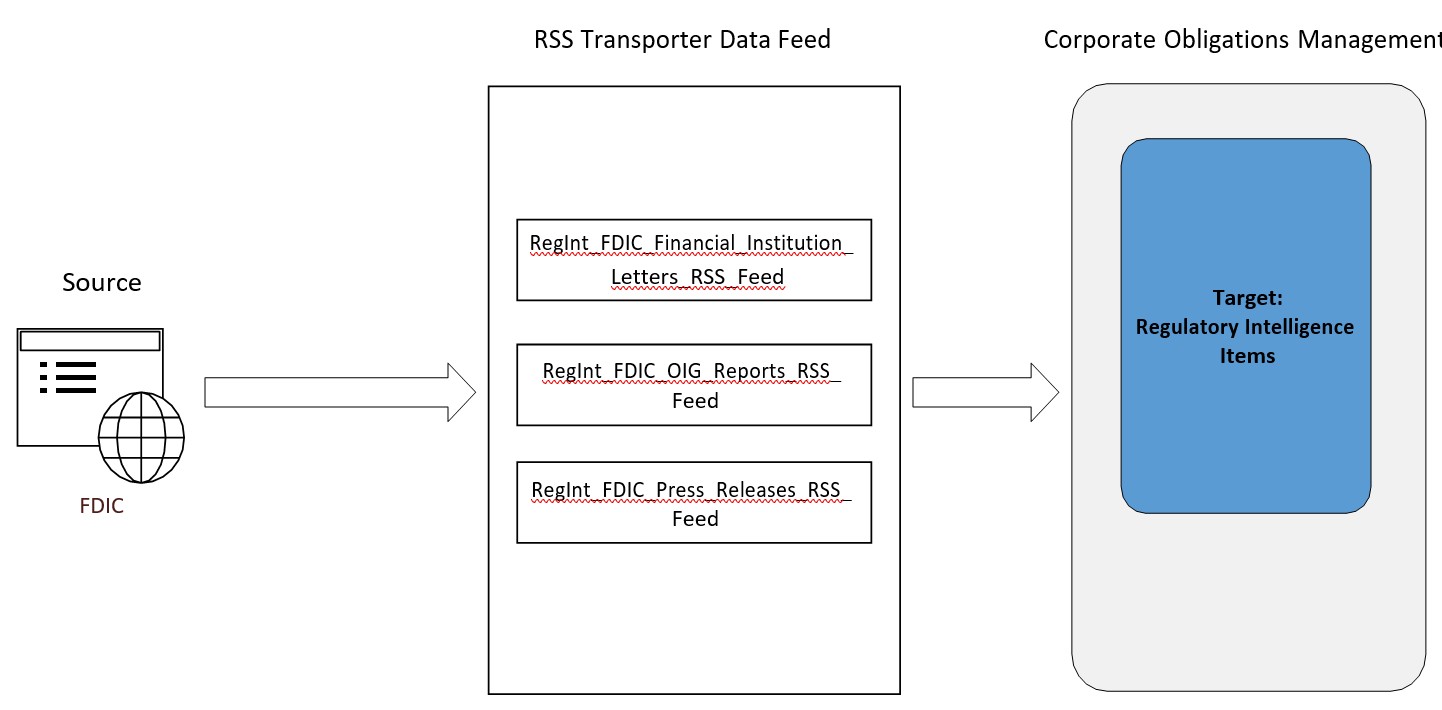
Architecture diagram
Business process
The business process follows the following flow:
-
FDIC posts the most recent news, alerts, or updates on regulatory compliance on their website in several formats, including XML. This includes:
-
Current FDIC news and information;
-
Reports provided by the independent unit that conducts audits, investigations, and other reviews of the FDIC programs and operations; and
-
Advisories to bankers regarding the latest changes in policies or procedures, or new products available.
-
-
The integration pulls the below mentioned data from the source: FDIC website and imports the
data into Target: Archer’s Regulatory Intelligence Items application within the following fields:
-
title -> Title
-
Source -> Source
-
link -> Link
-
pubDate -> Date Published
-
guid -> GUID
-
description -> Abstract
-
Installation
This section provides instructions for configuring the integration. This document is not intended to suggest optimum installations or configurations.
It is assumed that the reader has both working knowledge of all products involved, and the ability to perform the tasks outlined in this section. Administrators should have access to the product documentation for all products to install the required components.
The prerequisite use cases must be installed and working prior to the integration. Perform the necessary tests to confirm that this is true before proceeding.
Prerequisites (system requirements)
The Regulatory Intelligence Items application is required for installation and operation of the U.S. Federal Deposit Insurance Corporation (FDIC) Data Feeds Content Integration. It serves as a target application for the data feed.
Setting up data feed
The following data feed issued as a part of the integration process:
-
RegInt_FDIC_Financial_Institution_Letters_RSS_Feed is an RSS transporter feed which fetches the data from https://public.govdelivery.com/topics/USFDIC_19/feed.rss site and creates/updates the records in Regulatory Intelligence Items Application.
-
RegInt_FDIC_OIG_Reports_RSS_Feed is an RSS transporter feed which fetches the data from https://public.govdelivery.com/topics/USFDIC_18/feed.rss site and creates/updates the records in Regulatory Intelligence Items Application.
-
RegInt_FDIC_Press_Releases_RSS_Feed is an RSS transporter feed which fetches the data from https://public.govdelivery.com/topics/USFDIC_26/feed.rss site and creates/updates the records in Regulatory Intelligence Items Application.
For data feed configuration, perform the following steps:
-
Log into the Archer platform and click the Administration workspace tab.
-
Click Data Feeds in the Navigation Menu under Integration.
-
Click the Import link and browse to the [File_Name].dfx5.
-
Verify settings on the General Information tab. Be sure to change the status to Active before using the feed.
-
Verify the settings on the Transport tab.
Note: Default Retrieval Count is set to 1 Day. Update this as per your requirement.
-
Verify the settings on the Source Definition tab. This will be pre-configured to identify the necessary fields to generate a score snapshot.
Note: The Source Field on the Source Definition tab will be automatically populated when you import the data feed. Repopulating the fields by clicking on “Load Fields” will lead to removal of one pre-populated field from the list (i.e. Source). Hence, add a new field by clicking on “Add New” and rename as “Source” and select field type “Static Text” with appropriate value in the Text editor . Also, be sure that the data mappings are configured correctly after the load fields.
Datafeed Source Static Text value RegInt:FDIC Financial Institution Letters RSS Feed FDIC: Financial Institution Letters RegInt:FDIC OIG Reports RSS Feed FDIC: OIG Reports RegInt:FDIC Press Releases RSS Feed FDIC: Press Releases
-
Verify the settings and mappings on the Data Map tab.
Note: If an article with same GUID is provided by multiple feeds, then Source is replaced in the record. If you want to append the source information, update the field configuration to allow multiple values in selection and then update the data mapping configuration to append for the Source field.
-
The Key Definition fields should be pre-populated based on the information from the DFX import file. Ensure that the Key Definition field (GUID) is set.
-
The final configuration step is to schedule the data feed. Click the Run Configuration tab and configure the frequency and start time of the Data Feed.
-
Click Save to apply your configuration to the data feed. Click on Run Now to run the data feed immediately. Click the data feed status (Completed/Faulted/Warning etc) link for additional information on the status of the feed or to troubleshoot any feed errors.
Certification environment
Date tested: January 2026
|
Product Name |
Version Information |
Operating System |
|---|---|---|
|
Archer |
2025.12 |
Windows |