RSA Identity Governance & Lifecycle User Provisioning
Archer provides IT security risk and compliance features. Archer allows building an efficient, collaborative enterprise governance, risk and compliance (GRC) program across IT, finance, operations and legal domains. With Archer, one can manage risks, demonstrate compliance, automate business processes, and gain visibility into corporate risk and security controls.
Integrating Archer with RSA Identity Governance & Lifecycle helps you improve access decisions, reduce the risk of inappropriate access, and better analyze security incidents by providing access to identity context and application entitlement data.
Archer Connector helps you govern and provision user access to Archer. You can use the business governance processes within RSA Identity Governance & Lifecyle to request, provision, and de-provision user access to workspaces within Archer.
Archer Exchange: With the Archer Exchange, the Archer team has created a broad selection of supplemental, value-added offerings to help you get your unique risk management program on the right path, right from the start. You can leverage the Archer Exchange offerings to expand the use of Archer solutions into new business processes and address specific industry, geographic, regulatory, or technical requirements.
On this page
Release notes
|
Release Date |
Release Version |
Notes |
|---|---|---|
|
November 2024 |
2024.09 |
Recertification for Archer Platform Releases 2024.09 |
|
December 2019 |
6.7 |
Initial Release |
RSA does not provide an installation package on the Archer Exchange. To learn more about the RSA Identity Governance & Lifecycle User Provisioning integration, please contact RSA.
Overview
RSA Identity Governance & Lifecyle’s Collector for Archer provides a rich data context about users (such as their access, identity attributes, violations, accounts, etc.) and applications (entitlements, access) from Archer.
This documentation provides an overview of the Connector and Collectors for Archer end point. The guide describes the required configurations, parameters, and mappings of different attributes between the Connector and Collectors and how to use the AppWizard to integrate Archer with RSA Identity Governance &Lifecycle.
Key features and benefits
The RSA Identity Governance & Lifecycle User Provision integration enables organizations to:
-
Increase control of and visibility into who has access to what risk data, why access has been provided, and how acquired access was acquired
-
Ensure user access to Archer aligns with corporate control policies
-
Reduce the risk of inappropriate access, compliance failures, and breaches
Prerequisites (ODA and system requirements)
|
Components |
Prerequisites |
|---|---|
|
Archer Solution Area(s) |
Archer Platform |
|
Archer Use Case(s) |
N/A |
|
Archer Applications |
N/A |
|
Uses Custom Objects |
No |
|
Requires Archer On-Demand Application (ODA) License |
This offering requires Zero (0) Archer On-Demand Applications. |
|
Archer requirements |
Archer Platform Release 2024.09 and later |
|
Supported Archer Environments |
The following Archer environments are supported:
|
|
Partner/Vendor Requirements |
Valid RSA license is required. Additional fees may apply. |
Installing required certificates
Archer certificate should be added to the appropriate trust-stores. Follow the steps mentioned below for adding certificates to the trust-stores of WebSphere, WebLogic and WildFly application servers.
 WebSphere Application Server
-
Log in to WebSphere Administrative console: http://<HOST_NAME>:9060/ibm/console/login.do
-
In left panel, expand Security menu.
-
Click on SSL certificate and then click the key management link.
-
Under Configuration Settings, click the Manage endpoint security configurations link.
-
Select Outbound properties for the appropriate node.
-
Click on appropriate node link to get the properties.
-
Under Related Items, click Key stores and certificates and then click the ‘NodeDefaultTrustStore’ key store.
-
Under Additional Properties, click Signer certificates and then click Retrieve From Port.
-
In the Host field, enter <archer host_name>, enter 443 in the Port field, and archer_certin the Alias field
-
Click Retrieve Signer Information.
-
Verify that the certificate information is for a certificate that you can trust.
-
Click Apply and then click Save.
-
Now, create Archer V3 collectors using below mentioned steps for creating the collectors. Even after following all 12 steps mentioned above, if collectors don’t work as expected and show SSL certificate issue, the authority certificate must be added in the keystore.
-
Now, again go to Key stores and certificates and click the Aveksa Keystore.
-
Under Additional Properties, click Signer certificates and then click Retrieve From Port.
-
In the Host field, enter authority url, 443 in the Port field, and authority_cert in the Alias field.
-
Click Retrieve Signer Information.
-
Verify that the certificate information is for the certificate that you can trust.
-
Click Apply and then click Save.
-
Login into WebSphere machine using SSH (e.g. putty).
-
On command prompt, run : /home/oracle/AFX/afx stop
-
On command prompt, run : /opt/IBM/WebSphere/AppServer/bin/stopServer.sh server1
-
On command prompt, run : /opt/IBM/WebSphere/AppServer/bin/startServer.sh server1
-
On command prompt, run : /home/oracle/AFX/afx start.
WebLogic Application Server
-
Download/retrieve the Archer SSL certificate in PEM format e.g. archer.pem and save them at location /home/oracle.
-
Log in to WebLogic Administrative console:http://<HOST_NAME>.aveksa.local:7001/console/login/LoginForm.jsp
-
Under Domain Configurations, in the Environment section, click Servers link.
-
Click aveksa Server link.
-
Click the SSL tab.
-
Click Advanced link.
-
Select HostName as Verification = None.
-
Save the settings.
-
Login into WebLogic machine using SSH (e.g. putty)
-
cd /home/oracle/
-
Add archer.pem certificate in server.keystore by using keytool :
Run :keytool -import -file archer.pem -alias archer -keystore server.keystore
Run :keytool -import -file <authority_certificate> -alias <alias> -keystore server.keystore
-
It will ask for keystore password. Default keystore password is Av3k5a15num83r0n3
-
Restart SSL on WebLogic Server as described below:
-
Go to Servers > Controls tab.
-
Select/check aveksaServer(admin) and then click Restart SSL
-
-
Restart the server.
-
/home/oracle/AFX/afx stop
-
Run:/home/oracle/wls/12.1.3.0/user_projects/domains/aveksaDomain/bin/stopWe
Logic.sh
-
Run:/home/oracle/wls/12.1.3.0/user_projects/domains/aveksaDomain/bin/star
tWebLogic.sh
-
/home/oracle/AFX/afx start
-
WildFly Application Server
-
Download/retrieve the Archer SSL certificate in PEM format e.g. archer.pem and save at some location.
-
cd <$JAVA_HOME>/jre/lib/security.
-
Add certificates in cacerts by using keytool: keytool -import -file archer.pem -alias archer -keystore cacerts
-
Password for keystore (unless you have made any changes): changeit
-
Restart the server:
-
Run :afx stop
-
Run :acm stop
-
Run :acm start
-
Run :afx start
-
Using Archer Application Wizard to Configure Connector and Collectors
RSA Identity Governance and Lifecycle provides an Application Wizard which simplifies the process of setting up Archer Connector and Collectors.Use the Application Wizard to initially set up Archer Connectors and Collectors. If you need to modify these Connectors/Collectors later, then please refer to next section(s).
Configure Connector and Collectors Using Archer Application Wizard
-
Log in to RSA Identity Governance and Lifecycle.
-
Go to Resources > Applications and click Create Application.
-
From the list of applications, select Archer.
-
Click Next.
-
The Setup page is there to provide an overview of the Archer endpoint, as well as collector and connector information. Now click Next.
-
Fill out the Connect page with information regarding connecting to the Archer endpoint.
Parameter Name
Description
Application Name
Any name to identify this application
Scheme
HTTP or HTTPS
Host
Host name of the Archer endpoint server
Port
Port number of the Archer endpoint server
Admin Name
Archer Administrator account name which will be getting used for the provisioning of different entities and collections
Admin Password
Archer Administrator password
Website Name
Configured on Archer web server
Instance Name
Archer Instance name
Domain Name
Archer Domain name
Paging to fetch data
Paging size required to fetch data from Archer, by default it is
1000 ( being used for all the Collectors)
AFX Server
Select Available AFX server from the drop down list
-
Click Test Connection to check the connectivity to the endpoint from Identity Governance and Lifecycle instance.
-
Click Next.
-
On the Confirm Changes page, confirm all the provided details. If there are any corrections required, click Back to return to previous page.
-
Click Next.
-
The Change Summary page lists all the components created by this Application Wizard:
-
A new Archer Application that will have Connector and Collectors binding.
-
Custom attribute User Id created for Account
-
Custom attribute Group Id created for Group
-
Custom attribute Role Id created for Application Role
-
Account Collector (ADC) to collect Accounts and Groups.
-
Entitlement Collector (EDC) to collect entitlements of Account.
-
AFX Connector
-
Request Form
-
Account Template
-
-
-
Click Finish to close the Wizard.
Creating New Archer Collectors - ADC & EDC (Optional)
The Application Wizard provides guidance for creating the Archer Collectors. Use this section only if you need to create a new Archer Collector, which can be configured later with some Application. The recommended approach is to use the Application Wizard to get the Application- Collectors-Connector binding and Account template configurations created.
Prerequisites
Archer Account Data Collectors and Entitlement Data Collectors use REST APIs provided by the Archer end point. Ensure that the Archer endpoint has REST API support enabled and is accessible from the Identity Governance and Lifecycle installed server location.
Following attributes will be collected from Archer:
|
Type |
Attribute |
|---|---|
|
Account |
Email AccountNameStatus GivenNameFamilyNameUserID Department businessUnitLastLoginDate Company Phone Lockedstatus disabledStatus |
|
Group |
GroupName GroupID |
|
Role |
role_ID Role_name Description Alias updateDate isDefault |
Adding Additional Attributes (Custom Attributes)
• Login to RSA Identity Governance and Lifecycle
• G o to Admin > Attributes
Account
Go to "Account" tab and add following attributes if they do not exist:
|
Attribute Name |
Data Type |
Database ID |
Data Source |
In Detail |
In Popup |
Mandatory |
|---|---|---|---|---|---|---|
|
|
String |
<one of available> |
Collected |
Yes |
Yes |
No |
|
AccountName |
String |
<one of available> |
Collected |
Yes |
Yes |
No |
|
Status |
String |
<one of available> |
Collected |
Yes |
Yes |
No |
|
GivenName |
String |
<one of available> |
Collected |
Yes |
Yes |
No |
|
FamilyName |
String |
<one of available> |
Collected |
Yes |
Yes |
No |
|
UserID |
String |
<one of available> |
Collected |
Yes |
Yes |
Yes |
|
Department |
String |
<one of available> |
Collected |
Yes |
Yes |
No |
|
BusinessUnit |
String |
<one of available> |
Collected |
Yes |
Yes |
No |
|
LastLoginDat e |
String |
<one of available> |
Collected |
Yes |
Yes |
No |
|
Company |
String |
<one of available> |
Collected |
Yes |
Yes |
No |
|
Phone |
String |
<one of available> |
Collected |
Yes |
Yes |
No |
|
Lockedstatus |
String |
<one of available> |
Collected |
Yes |
Yes |
No |
|
DisabledStatus |
String |
<one of available> |
Collected |
Yes |
Yes |
No |
Group
Go to "Group" tab and add following attributes if they do not exist:
|
Attribute Name |
Data Type |
Database ID |
Data Source |
In Detail |
In Popup |
Mandatory |
|---|---|---|---|---|---|---|
|
GroupName |
String |
<one of available> |
Collected |
Yes |
Yes |
No |
|
GroupID |
String |
<one of available> |
Collected |
Yes |
Yes |
Yes |
Role
Go to "Application Role" tab and add following attributes if they do not exist:
|
Attribute Name |
Data Type |
Database ID |
Data Source |
In Detail |
In Popup |
Mandatory |
|---|---|---|---|---|---|---|
|
Role ID |
String |
<one of available> |
Collected |
Yes |
Yes |
Yes |
|
Role Name |
String |
<one of available> |
Collected |
Yes |
Yes |
No |
|
Description |
String |
<one of available> |
Collected |
Yes |
Yes |
No |
|
Alias |
String |
<one of available> |
Collected |
Yes |
Yes |
No |
|
UpdateDate |
String |
<one of available> |
Collected |
Yes |
Yes |
No |
Collector configuration
To set up a new instance of the Archer Collectors (ADC/EDC):
1. Login to RSA Identity Governance and Lifecycle.
2. Select the application already created to create ADC or EDC (Resources > Applications).
3. Click the Collectors tab.
4. Click Create Account Collector or Create Entitlement Collector depending on the requirement.
5. Configure the collectors based on your requirements:
Creating new Account Data Collector (ADC)
-
Configure the Collector Description screen with these values:
Field Name
Value
Collector Name
Archer Account Data Collector
Description
Archer’s Account Data Collector
Data Source Type
Archer
Agent
AveksaAgent
Business Source
Application for Archer
Status
Active
Copy from
Select Existing Archer Account Collector if you want to use same collector configuration
Scheduled
Default : No
-
Click Next. .
-
Configure the Configuration Information screen referencing these values:
Field Name
Value
Scheme
http or https
Host
< Host or IP on which Archer Instance is running >
Port
<Archer Server port>
Admin Name
< Name of the Admin user to login>
Admin Password
< Password of the admin of the domain registered with Archer>
Application Name
<Application name/Website name>
Instance Name
<Instance Name of the Archer>
Domain Name
<Domain Name of the Archer>
Paging to fetch data
<Size of Paging data to be fetched at a time>Default : 1000
-
Click Next.
-
Configure the Map Collector Attributes to Account Attributes screen with these values:
Field Name
Value
Last Login Date
<Custom attribute to collect Last Login Date>
Expiration Date
A Non-Mandatory field. Not applicable to the Archer Collector because there is no attribute similar to “Expiration Date” for accounts provided in the REST API response from Archer.
User Id
user Id
-
Click Next.
-
Configure the Map Collector Attributes to Account Mapping Attributes screen with these values:
Field Name
Value
User Reference
accountname
-
Click Next.
-
Configure the Map Collector Attributes to Group Attributes screen with these values:
Field Name
Value
Group id
group Id
Owner
N/A
-
Click Next.
-
Configure the Edit User Resolution Rules screen with these values:
Field Name
Value
Target Collector
<Cloud IDC> Default: Users
User Attribute
<Email Address> Default: UserID
-
Click Next.
-
Configure the Edit Member Account Resolution Rules screen with these values:
Field Name
Value
Target Collector
Archer Account Data Collector
Account Attribute
User ID
-
Click Next.
-
Configure the Edit Sub-group Resolution Rules screen with these values.
Field Name
Value
Target Collector
Archer Account Data Collector
Group Attribute
Group ID
-
Click Finish to save this Collector.
Creating new Entitlement Data Collector
-
Configure the Collector Description screen with these values:
Field Name
Value
Collector Name
Archer Entitlement Data Collector
Description
Archer’s Entitlement Data Collector
Business Source
Application for Archer
Data Source Type
Archer
Agent
AveksaAgent
Status
Active
Copy from
Select Existing Archer Entitlement Collector if you want to use same collector configuration.
Scheduled
Default : No
-
Click Next.
-
Configure the Configuration Information screen with these values:
Field Name
Value
Scheme
http or https
Host
< Fully qualified IP/hostname>
Port
<Archer Server port>
Admin Name
<Admin Username>
Admin Password
<Admin Password>
Application Name
< Application/Website name (Found in the Archer control panel -> Instance -> Web tab ->BaseUrl field)>
Instance Name
<Archer instance name>
Domain Name
<Archer Domian Name>
Paging to fetch data
<Size of paging data to be fetched at a time (default : 1000)>
-
Click Next.
-
Configure the “Map Collector Attributes to App Role Attributes” screen with these values:
Field Name
Value
Role ID
role_id of the App Role collected
-
Click Next.
-
Configure Group Evaluation screen with these values:
Field Name
Value
Associated Collector
Archer Account Data Collector
Group value evaluates to
Group ID
-
Click Next.
-
Configure Account Evaluation screen with these values:
Field Name
Value
Associated account Collector
Archer Account Data Collector
Account value evaluates to
User ID
-
Click Finist to save the Collector.
Creating a New Archer Connector (Optional)
The Application Wizard provides guidance for creating the Archer Connector. Use this section only if you need to create a new Archer Connector, which can be configured later with some Application. The recommended approach is to use the Application Wizard to get the Application- Connector binding and Account template configurations created.
Note: The created Connector will be in ‘Test’ mode by default and cannot be used with any application unless it is set to the Active mode.
Prerequisites
Archer Connector makes use of REST APIs provided by the Archer endpoint. Make sure that the Archer endpoint has REST API support enabled and is accessible from the RSA Identity Governance and Lifecycle installed server location.
Connector configuration
Set up a new instance of the Archer Connector.
The Connector creation is made up of three sections:
-
General – General details about the Connector, such as the name, type, etc.
-
Settings – The connection settings required to connect RSA Identity Governance and Lifecycle with the endpoint application in consideration.
-
Capabilities – These are the list of “verbs” or capabilities that Connector supports; for example: Create, Update, Delete, etc.
To set up a new instance of the Archer connector without using the Application Wizard:
-
Log in to RSA Identity Governance and Lifecycle.
-
From the top menu bar, go to AFX > Connectors.
-
Click Create Connector.
-
Use the reference tables below to configure the connector.
General
The following describes the Parameters the “General” page.
|
Parameter |
Value |
|---|---|
|
Name |
<Provide Connector instance Name> |
|
Description |
<Provide some description for this Connector instance> |
|
Server |
<Select available AFX Server> |
|
Connector Template |
RestFul Webservice |
|
State |
Test (It can be changed later to “Active”, once capabilities are tested) |
|
Export As Template |
Name of Connector template |
Note: When you are satisfied your connector is configured properly, change the state to Active. No automated provisioning will occur while in the Test state. It is recommended that you test all enabled commands using Test Connector Capabilities prior to changing to the Active state.
Settings
The following table describes the parameters on the “Settings” page.
|
Field Name |
Description |
|---|---|
|
Scheme |
HTTP or HTTPS (Scheme to use to access the RESTful web service) In case of using HTTPS, make sure that all the required certificates (Archer server certs as well as all the certs required in chain) are added to the jre’s keystore. ( See the Troubleshooting and Tips section for information about keystore settings.) |
|
Host |
<Fully qualified Archer Server Hostname/IP> |
|
Port |
<Port number to access Archer server rest services> |
|
Admin Username |
<Username for authentication> |
|
Admin Password |
<Password for authentication> |
|
Application Name |
<Application/Website name> Can be found in the Archer control panel > Instance > Web tab>→ BaseUrl field |
|
Instance Name |
<Archer Instance Name> |
|
Domain Name |
<Archer Domain Name> |
|
Follow redirects (GET requests only) |
<If checked and the RESTful web service call is a GET, redirects will be followed> |
|
Response timeout (in milliseconds) |
<The number of milliseconds to wait for a response> (default is 10000) |
|
Asynchronous callback? |
If checked, after a successful response from the web service, AFX will wait for a callback |
|
Proxy Host |
<Hostname of the proxy server> |
|
Proxy Port |
<Port of the proxy server>Default : 0 |
|
Proxy User Name |
<User name for the proxy server> |
|
Proxy Password |
<Password for the proxy server> |
Capabilities
The following capabilities are supported for the Archer Connector:
|
Category |
Command |
|---|---|
|
Login |
Login |
|
Account |
Create an Account Delete an Account Reset an Account Password Add Account to Group Remove Account from Group Enable an Account Disable an Account Update an Account Add Application Role to Account Remove Application Role from Account |
|
Group |
Create a Group Delete a Group Update a Group Add Application Role to a Group Remove Application Role from a Group Add a Group to a Group Remove a Group from a Group |
|
Role |
Create a Role Delete a Role Update a Role |
Command Input Parameters Login
|
Field Name |
Value |
|---|---|
|
Path |
${Settings.Application}/api/core/security/login |
|
Encode Path |
Check if path encodingrequired Default-unchecked(false) |
|
Method |
POST |
|
Request Headers |
Content-Type:application/json |
|
Request body |
{"UserDomain":"","Password":"${Settings.Password}","Username":"${Settings .Username}","InstanceName":"${Settings.Instance}"} |
|
Status Code |
Expression Type:JsonPath Expression:IsSuccessful Pattern/Replacement true/0 false/1 Partial Match: unchecked for both OR Expression Type: statusCode Expression: Pattern/Replacement 1. ^[23]\d{2}$/0 2. ^([45])\d{2}$/$1 Partial Match: unchecked for both |
|
Brief Response |
Expression Type: JsonPath Expression: ValidationMessages[0]/MessageKey OR Expression Type :statusCode |
|
Detailed Response |
Expression Type: JsonPath Expression: ValidationMessages[0]/MessageKey OR Expression Type: statusCode |
|
SessionToken |
Expression Type:JsonPath Expression: RequestedObject/SessionToken |
Note: No input parameters should be configured, use parameters from Settings page as ${Settings.paramName} if required in request body.
Create an Account
|
Field Name |
Value |
|---|---|
|
Parameter Name |
FirstName |
|
Type |
String |
|
Default Value |
N/A |
|
Is the parameter required? |
Yes |
|
Is the parameter encrypted? |
No |
|
Display Name |
First Name |
|
Mapping |
${User.First_Name} |
|
Description: |
Account First Name |
|
Field Name |
Value |
|---|---|
|
Parameter Name |
LastName |
|
Type |
String |
|
Default Value |
N/A |
|
Is the parameter required? |
Yes |
|
Is the parameter encrypted? |
No |
|
Display Name |
Last Name |
|
Mapping |
${User.Last_Name} |
|
Description: |
Account Last Name |
|
Field Name |
Value |
|---|---|
|
Parameter Name |
Password |
|
Type |
String |
|
Default Value |
N/A |
|
Is the parameter required? |
Yes |
|
Is the parameter encrypted? |
Yes |
|
Display Name |
Password |
|
Mapping |
${AccountTemplate.Password} |
|
Description: |
Account Password |
|
Field Name |
Value |
|---|---|
|
Parameter Name |
SessionToken |
|
Type |
String |
|
Default Value |
N/A |
|
Is the parameter required? |
No |
|
Is the parameter encrypted? |
No |
|
Display Name |
SessionToken |
|
Mapping |
“” |
|
Description: |
SessionToken |
|
Field Name |
Value |
|---|---|
|
Parameter Name |
UserName |
|
Type |
String |
|
Default Value |
N/A |
|
Is the parameter required? |
Yes |
|
Is the parameter encrypted? |
Yes |
|
Display Name |
UserName |
|
Mapping |
${User.UserId} |
|
Description: |
Username |
Command Code
|
Field Name |
Value |
|---|---|
|
Generate SessionToken |
Checked(true) Note: Have the login command configured |
|
Path |
${Settings.Application}/api/core/system/user |
|
Encode Path |
Check if path encoding required Default- unchecked(false) |
|
Method |
POST |
|
Request Headers |
Content-Type:application/jsonAccept:application/json; charset=utf-8 Authorization:Archersession-id=”${SessionToken}” |
|
Request body |
{ "User": { "FirstName": "${FirstName}", "LastName": "${LastName}", "UserName": "${UserName}" }, "Password": "${Password}" } Note: Can add more parameters to create account, with valid json request. |
|
Status Code |
Expression Type:JsonPathExpression:IsSuccessful Pattern/Replacement
Partial Match:unchecked for both OR Expression Type:statusCode Expression: Pattern/Replacement 1. ^[23]\d{2}$/0 2. ^([45])\d{2}$/$1 Partial Match:unchecked for both |
|
Brief Response |
Expression Type:JsonPath Expression: ValidationMessages[0]/ResourcedMessage OR Expression Type:statusCode |
|
Detailed Response |
Expression Type:JsonPath Expression: ValidationMessages[0]/ResourcedMessage OR Expression Type:statusCode |
Note: Have StatusCode, BriefResponse, DetailedResponse configured to same Expression Type; for example:statusCode/jsonPath
Configure the output parameter in the Create Account command
-
Login to RSA Identity Governance and Lifecycle.
-
From the top menu bar, click AFX > Connectors
-
Click on the Archer Connector for which you want to configure the output parameter.
-
Click Edit.
-
Click the Capabilities tab and then click Create an Account.
-
Under Command Output Parameters, click Add More.
-
Provide ‘Account Id’ as ‘Parameter Name’ and select ‘Account.User_Id’ as ‘Mapping’.
-
In ‘AccountId’ response at the end of the page, select ‘JsonPath’ as ‘Expression Type’ and add‘RequestedObject/Id’ as ‘Expression’
-
Click OK to save the configurations
-
Delete an Account
|
Field Name |
Value |
|---|---|
|
Parameter Name |
Account Id |
|
Type |
Number |
|
Default Value |
N/A |
|
Is the parameter required? |
Yes |
|
Is the parameter encrypted? |
No |
|
Display Name |
Account Id |
|
Mapping |
${Account.UserId} |
|
Description: |
Account Id to be deleted |
|
Field Name |
Value |
|---|---|
|
Parameter Name |
SessionToken |
|
Type |
String |
|
Default Value |
N/A |
|
Is the parameter required? |
No |
|
Is the parameter encrypted? |
No |
|
Display Name |
SessionToken |
|
Mapping |
“” |
|
Description: |
SessionToken |
Command Code
|
Field Name |
Value |
|---|---|
|
Generate SessionToken |
Checked(true) Note: Have the login command configured |
|
Path |
${Settings.Application}/api/core/system/user/${AccountId} |
|
Encode Path |
Check if path encoding required Default- unchecked(false) |
|
Method |
DELETE |
|
Request Headers |
Content-Type:application/json Accept:application/json; charset=utf-8 Authorization:Archer session-id=”${SessionToken}” |
|
Request body |
N/A |
|
Status Code |
Expression Type:JsonPathExpression:IsSuccessful Pattern/Replacement
Partial Match:unchecked for both OR Expression Type:statusCode Expression: Pattern/Replacement 1. ^[23]\d{2}$/0 2. ^([45])\d{2}$/$1 Partial Match:unchecked for both |
|
Brief Response |
Expression Type:JsonPath Expression: ValidationMessages[0]/ResourcedMessage OR Expression Type:statusCode |
|
Detailed Response |
Expression Type:JsonPath Expression: ValidationMessages[0]/ResourcedMessage OR Expression Type:statusCode |
Note: Have StatusCode, BriefResponse, DetailedResponse configured to same Expression Type; for example:statusCode/jsonPath
Reset an Account Password
|
Field Name |
Value |
|---|---|
|
Parameter Name |
Account Id |
|
Type |
Number |
|
Default Value |
N/A |
|
Is the parameter required? |
Yes |
|
Is the parameter encrypted? |
No |
|
Display Name |
Account Id |
|
Mapping |
${Account.UserId} |
|
Description: |
Id of account who’s password is to be reset |
|
Field Name |
Value |
|---|---|
|
Parameter Name |
SessionToken |
|
Type |
String |
|
Default Value |
N/A |
|
Is the parameter required? |
No |
|
Is the parameter encrypted? |
No |
|
Display Name |
SessionToken |
|
Mapping |
“” |
|
Description: |
SessionToken |
|
Field Name |
Value |
|---|---|
|
Parameter Name |
Password |
|
Type |
String |
|
Default Value |
N/A |
|
Is the parameter required? |
Yes |
|
Is the parameter encrypted? |
Yes |
|
Display Name |
New Password |
|
Mapping |
“” |
|
Description: |
New Password value |
Command Code
|
Field Name |
Value |
|---|---|
|
Generate SessionToken |
Checked(true) Note: Have the login command configured |
|
Path |
${Settings.Application}/api/core/system/userpassword |
|
Encode Path |
Check if path encoding required Default- unchecked(false) |
|
Method |
PUT |
|
Request Headers |
Content-Type:application/jsonAccept:application/json; charset=utf-8 Authorization:Archer session-id=”${SessionToken}” |
|
Request body |
{"UserId":${AccountId},"NewPassword":"${Password}"} |
|
Status Code |
Expression Type:JsonPathExpression:IsSuccessful Pattern/Replacement
Partial Match:unchecked for both OR Expression Type:statusCode Expression: Pattern/Replacement 1. ^[23]\d{2}$/0 2. ^([45])\d{2}$/$1 Partial Match:unchecked for both |
|
Brief Response |
Expression Type:JsonPath Expression: ValidationMessages[0]/ResourcedMessage OR Expression Type:statusCode |
|
Detailed Response |
Expression Type:JsonPath Expression: ValidationMessages[0]/ResourcedMessage OR Expression Type:statusCode |
Note: Have StatusCode, BriefResponse, DetailedResponse configured to same Expression Type; for example: statusCode/jsonPath
Add Account to Group
|
Field Name |
Value |
|---|---|
|
Parameter Name |
Account Id |
|
Type |
Number |
|
Default Value |
N/A |
|
Is the parameter required? |
Yes |
|
Is the parameter encrypted? |
No |
|
Display Name |
Account Id |
|
Mapping |
${Account.UserId} |
|
Description: |
Account Id to be added to group |
|
Field Name |
Value |
|---|---|
|
Parameter Name |
Group Id |
|
Type |
Number |
|
Default Value |
N/A |
|
Is the parameter required? |
Yes |
|
Is the parameter encrypted? |
No |
|
Display Name |
Group Id |
|
Mapping |
${Group.Group_Id} |
|
Description: |
Group Id where account is to be added |
|
Field Name |
Value |
|---|---|
|
Parameter Name |
SessionToken |
|
Type |
String |
|
Default Value |
N/A |
|
Is the parameter required? |
No |
|
Is the parameter encrypted? |
No |
|
Display Name |
SessionToken |
|
Mapping |
“” |
|
Description: |
SessionToken |
Command Code
|
Field Name |
Value |
|---|---|
|
Generate SessionToken |
Checked(true) Note: Have the login command configured |
|
Path |
${Settings.Application}/api/core/system/usergroup |
|
Encode Path |
Check if path encoding required Default- unchecked(false) |
|
Method |
PUT |
|
Request Headers |
Content-Type:application/jsonAccept:application/json; charset=utf-8 Authorization:Archer session-id=”${SessionToken}” |
|
Request body |
{"UserId":${AccountId},"GroupId":${GroupId},"IsAdd":true} |
|
Status Code |
Expression Type:JsonPathExpression:IsSuccessful Pattern/Replacement
|
|
Brief Response |
Expression Type:JsonPath Expression: ValidationMessages[0]/ResourcedMessage OR Expression Type:statusCode |
|
Detailed Response |
Expression Type:JsonPath Expression: ValidationMessages[0]/ResourcedMessage OR Expression Type:statusCode |
Note: Have StatusCode, BriefResponse, DetailedResponse configured to same Expression Type; for example: statusCode/jsonPath
Remove Account from Group
|
Field Name |
Value |
|---|---|
|
Parameter Name |
Account Id |
|
Type |
Number |
|
Default Value |
N/A |
|
Is the parameter required? |
Yes |
|
Is the parameter encrypted? |
No |
|
Display Name |
Account Id |
|
Mapping |
${Account.UserId} |
|
Description: |
Account Id to be removed from group |
|
Field Name |
Value |
|---|---|
|
Parameter Name |
Group Id |
|
Type |
Number |
|
Default Value |
N/A |
|
Is the parameter required? |
Yes |
|
Is the parameter encrypted? |
No |
|
Display Name |
Group Id |
|
Mapping |
${Group.Group_Id} |
|
Description: |
Group Id where account is to be removed |
|
Field Name |
Value |
|---|---|
|
Parameter Name |
SessionToken |
|
Type |
String |
|
Default Value |
N/A |
|
Is the parameter required? |
No |
|
Is the parameter encrypted? |
No |
|
Display Name |
SessionToken |
|
Mapping |
“” |
|
Description: |
SessionToken |
Command Code
|
Field Name |
Value |
|---|---|
|
Generate SessionToken |
Checked(true) Note: Have the login command configured |
|
Path |
${Settings.Application}/api/core/system/usergroup |
|
Encode Path |
Check if path encoding required Default- unchecked(false) |
|
Method |
PUT |
|
Request Headers |
Content-Type:application/jsonAccept:application/json; charset=utf-8 Authorization:Archer session-id=”${SessionToken}” |
|
Request body |
{"UserId":${AccountId},"GroupId":${GroupId},"IsAdd":false} |
|
Status Code |
Expression Type:JsonPathExpression:IsSuccessful Pattern/Replacement
Partial Match:unchecked for both OR Expression Type:statusCode Expression: Pattern/Replacement |
|
|
1. ^[23]\d{2}$/0 2. ^([45])\d{2}$/$1 Partial Match:unchecked for both |
|
Brief Response |
Expression Type:JsonPath Expression: ValidationMessages[0]/ResourcedMessage OR Expression Type:statusCode |
|
Detailed Response |
Expression Type:JsonPath Expression: ValidationMessages[0]/ResourcedMessage OR Expression Type:statusCode |
Note: Have StatusCode, BriefResponse, DetailedResponse configured to same Expression Type; for example: statusCode/jsonPath
Enable an Account
|
Field Name |
Value |
|---|---|
|
Parameter Name |
Account Id |
|
Type |
Number |
|
Default Value |
N/A |
|
Is the parameter required? |
Yes |
|
Is the parameter encrypted? |
No |
|
Display Name |
Account Id |
|
Mapping |
${Account.UserId} |
|
Description: |
Account Id to be enabled |
|
Field Name |
Value |
|---|---|
|
Parameter Name |
SessionToken |
|
Type |
String |
|
Default Value |
N/A |
|
Is the parameter required? |
No |
|
Is the parameter encrypted? |
No |
|
Display Name |
SessionToken |
|
Mapping |
“” |
|
Description: |
SessionToken |
Command Code
|
Field Name |
Value |
|---|---|
|
Generate SessionToken |
Checked(true) Note: Have the login command configured |
|
Path |
${Settings.Application}/api/core/system/user/status/active/${AccountId} |
|
Encode Path |
Check if path encoding required Default- unchecked(false) |
|
Method |
POST |
|
Request Headers |
Content-Type:application/jsonAccept:application/json; charset=utf-8 Authorization:Archer session-id=”${SessionToken}” |
|
Request body |
N/A |
|
Status Code |
Expression Type:JsonPath Expression:IsSuccessful Pattern/Replacement
Partial Match:unchecked for both OR Expression Type:statusCode Expression: Pattern/Replacement 1. ^[23]\d{2}$/0 2. ^([45])\d{2}$/$1 Partial Match:unchecked for both |
|
Brief Response |
Expression Type:JsonPath Expression: ValidationMessages[0]/ResourcedMessage OR Expression Type:statusCode |
|
Detailed Response |
Expression Type:JsonPath Expression: ValidationMessages[0]/ResourcedMessage OR Expression Type:statusCode |
Note: Have StatusCode, BriefResponse, DetailedResponse configured to same Expression Type; for example: statusCode/jsonPath
Disable an Account
|
Field Name |
Value |
|---|---|
|
Parameter Name |
Account Id |
|
Type |
Number |
|
Default Value |
N/A |
|
Is the parameter required? |
Yes |
|
Is the parameter encrypted? |
No |
|
Display Name |
Account Id |
|
Mapping |
${Account.UserId} |
|
Description: |
Account Id to be disabled |
|
Field Name |
Value |
|---|---|
|
Parameter Name |
SessionToken |
|
Type |
String |
|
Default Value |
N/A |
|
Is the parameter required? |
No |
|
Is the parameter encrypted? |
No |
|
Display Name |
SessionToken |
|
Mapping |
“” |
|
Description: |
SessionToken |
Command Code
|
Field Name |
Value |
|---|---|
|
Generate SessionToken |
Checked(true) Note: Have the login command configured |
|
Path |
${Settings.Application}/api/core/system/user/status/inactive/${AccountId} |
|
Encode Path |
Check if path encoding required Default- unchecked(false) |
|
Method |
POST |
|
Request Headers |
Content-Type:application/json Accept:application/json; charset=utf-8 Authorization:Archer session-id=”${SessionToken}” |
|
Request body |
N/A |
|
Status Code |
Expression Type:JsonPathExpression:IsSuccessful Pattern/Replacement 1. true/0 2. false/1 Partial Match:unchecked for both OR Expression Type:statusCode Expression: Pattern/Replacement 1. ^[23]\d{2}$/0 2. ^([45])\d{2}$/$1 Partial Match: unchecked for both |
|
Brief Response |
Expression Type:JsonPath Expression: ValidationMessages[0]/ResourcedMessage OR Expression Type:statusCode |
|
Detailed Response |
Expression Type:JsonPath Expression: ValidationMessages[0]/ResourcedMessage OR Expression Type:statusCode |
Note: Have StatusCode, BriefResponse, DetailedResponse configured to same Expression Type; for example: statusCode/jsonPath
Update an Account
|
Field Name |
Value |
|---|---|
|
Parameter Name |
FirstName |
|
Default Value |
N/A |
|
Is the parameter required? |
Yes |
|
Is the parameter encrypted? |
No |
|
Display Name |
First Name |
|
Mapping |
${User.First_Name} |
|
Description: |
Account First Name |
|
Type |
String |
|
Field Name |
Value |
|---|---|
|
Parameter Name |
LastName |
|
Type |
String |
|
Default Value |
N/A |
|
Is the parameter required? |
Yes |
|
Is the parameter encrypted? |
No |
|
Display Name |
Last Name |
|
Mapping |
${User.Last_Name} |
|
Description: |
Account Last Name |
|
Field Name |
Value |
|---|---|
|
Parameter Name |
Password |
|
Type |
String |
|
Default Value |
N/A |
|
Is the parameter required? |
Yes |
|
Is the parameter encrypted? |
Yes |
|
Display Name |
Password |
|
Mapping |
“” |
|
Description: |
Account Password |
|
Field Name |
Value |
|---|---|
|
Parameter Name |
SessionToken |
|
Type |
String |
|
Default Value |
N/A |
|
Is the parameter required? |
No |
|
Is the parameter encrypted? |
No |
|
Display Name |
SessionToken |
|
Mapping |
“” |
|
Description: |
SessionToken |
|
Field Name |
Value |
|---|---|
|
Parameter Name |
Account Id |
|
Type |
Number |
|
Default Value |
N/A |
|
Is the parameter required? |
Yes |
|
Is the parameter encrypted? |
No |
|
Display Name |
Account Id |
|
Mapping |
${Account.UserId} |
|
Description: |
Id of account to be updated |
Command Code
|
Field Name |
Value |
|---|---|
|
Generate SessionToken |
Checked(true) Note: Have the login command configured |
|
Path |
${Settings.Application}/api/core/system/user |
|
Encode Path |
Check if path encoding required Default- unchecked(false) |
|
Method |
PUT |
|
Request Headers |
Content-Type:application/json Accept:application/json; charset=utf-8 Authorization:Archer session-id=”${SessionToken}” |
|
Request body |
{"User":{"Id":${AccountId},"FirstName":"${FirstName}","LastName":"${LastNa me}","UserName":"${UserName}","AccountStatus":1}} Note: Can add more parameters to update account, with valid json request |
|
Status Code |
Expression Type:JsonPathExpression:IsSuccessful Pattern/Replacement
Partial Match:unchecked for both OR Expression Type:statusCode Expression: Pattern/Replacement 1. ^[23]\d{2}$/0 2. ^([45])\d{2}$/$1 Partial Match:unchecked for both |
|
Brief Response |
Expression Type:JsonPath Expression: ValidationMessages[0]/ResourcedMessage OR Expression Type:statusCode |
|
Detailed Response |
Expression Type:JsonPath Expression: ValidationMessages[0]/ResourcedMessage OR Expression Type:statusCode |
Note: Have StatusCode, BriefResponse, DetailedResponse configured to same Expression Type; for example: statusCode/jsonPath
Add Application Role to Account
|
Field Name |
Value |
|---|---|
|
Parameter Name |
Account Id |
|
Type |
Number |
|
Default Value |
N/A |
|
Is the parameter required? |
Yes |
|
Is the parameter encrypted? |
No |
|
Display Name |
Account Id |
|
Mapping |
${Account.UserId} |
|
Description: |
Account Id |
|
Field Name |
Value |
|---|---|
|
Parameter Name |
Role Id |
|
Type |
Number |
|
Default Value |
N/A |
|
Is the parameter required? |
Yes |
|
Is the parameter encrypted? |
No |
|
Display Name |
Role Id |
|
Mapping |
${ApplicationRole.Role_Id} |
|
Description: |
Role Id |
|
Field Name |
Value |
|---|---|
|
Parameter Name |
SessionToken |
|
Type |
String |
|
Default Value |
N/A |
|
Is the parameter required? |
No |
|
Is the parameter encrypted? |
No |
|
Display Name |
SessionToken |
|
Mapping |
“” |
|
Description: |
SessionToken |
Command Code
|
Field Name |
Value |
|---|---|
|
Generate SessionToken |
Checked(true) Note: Have the login command configured |
|
Path |
${Settings.Application}/api/core/system/usergroup |
|
Encode Path |
Check if path encoding required Default- unchecked(false) |
|
Method |
PUT |
|
Request Headers |
Content-Type:application/jsonAccept:application/json; charset=utf-8 Authorization:Archer session-id=”${SessionToken}” |
|
Request body |
{"UserId":${AccountId},"RoleId":${RoleId},"IsAdd":true} |
|
Status Code |
Expression Type:JsonPath Expression:IsSuccessful Pattern/Replacement
Partial Match:unchecked for both OR Expression Type:statusCode Expression: Pattern/Replacement 1. ^[23]\d{2}$/0 2. ^([45])\d{2}$/$1 Partial Match: unchecked for both |
|
Brief Response |
Expression Type:JsonPath Expression: ValidationMessages[0]/ResourcedMessage OR Expression Type:statusCode |
|
Detailed Response |
Expression Type:JsonPath Expression: ValidationMessages[0]/ResourcedMessage OR Expression Type:statusCode |
Note: Have StatusCode, BriefResponse, DetailedResponse configured to same Expression Type; for example: statusCode/jsonPath
Remove Application Role from Account
|
Field Name |
Value |
|---|---|
|
Parameter Name |
Account Id |
|
Type |
Number |
|
Default Value |
N/A |
|
Is the parameter required? |
Yes |
|
Is the parameter encrypted? |
No |
|
Display Name |
Account Id |
|
Mapping |
${Account.UserId} |
|
Description: |
Account Id |
|
Field Name |
Value |
|---|---|
|
Parameter Name |
Role Id |
|
Type |
Number |
|
Default Value |
N/A |
|
Is the parameter required? |
Yes |
|
Is the parameter encrypted? |
No |
|
Display Name |
Role Id |
|
Mapping |
${ApplicationRole.Role_Id} |
|
Description: |
Role Id |
|
Field Name |
Value |
|---|---|
|
Parameter Name |
SessionToken |
|
Type |
String |
|
Default Value |
N/A |
|
Is the parameter required? |
No |
|
Is the parameter encrypted? |
No |
|
Display Name |
SessionToken |
|
Mapping |
“” |
|
Description: |
SessionToken |
Command Code
|
Field Name |
Value |
|---|---|
|
Generate SessionToken |
Checked(true) Note: Have the login command configured |
|
Path |
${Settings.Application}/api/core/system/usergroup |
|
Encode Path |
Check if path encoding required Default- unchecked(false) |
|
Method |
PUT |
|
Request Headers |
Content-Type:application/jsonAccept:application/json; charset=utf-8 Authorization:Archer session-id=”${SessionToken}” |
|
Request body |
{"UserId":${AccountId},"RoleId":${RoleId},"IsAdd":false} |
|
Status Code |
Expression Type:JsonPath Expression:IsSuccessful Pattern/Replacement
Partial Match:unchecked for both OR Expression Type:statusCode Expression: Pattern/Replacement 1. ^[23]\d{2}$/0 2. ^([45])\d{2}$/$1 Partial Match:unchecked for both |
|
Brief Response |
Expression Type:JsonPath Expression: ValidationMessages[0]/ResourcedMessage OR Expression Type:statusCode |
|
Detailed Response |
Expression Type:JsonPath Expression: ValidationMessages[0]/ResourcedMessage OR Expression Type:statusCode |
Note: Have StatusCode, BriefResponse, DetailedResponse configured to same Expression Type; for example: statusCode/jsonPath
Create a Group
|
Field Name |
Value |
|---|---|
|
Parameter Name |
Group |
|
Type |
String |
|
Default Value |
N/A |
|
Is the parameter required? |
Yes |
|
Is the parameter encrypted? |
No |
|
Display Name |
Group Name |
|
Mapping |
“” |
|
Description: |
Group name to be created |
|
Field Name |
Value |
|---|---|
|
Parameter Name |
SessionToken |
|
Type |
String |
|
Default Value |
N/A |
|
Is the parameter required? |
No |
|
Is the parameter encrypted? |
No |
|
Display Name |
SessionToken |
|
Mapping |
“” |
|
Description: |
SessionToken |
Command Code
|
Field Name |
Value |
|---|---|
|
Generate SessionToken |
Checked(true) Note: Have the login command configured |
|
Path |
${Settings.Application}/api/core/system/group |
|
Encode Path |
Check if path encoding required Default- unchecked(false) |
|
Method |
POST |
|
Request Headers |
Content-Type:application/jsonAccept:application/json; charset=utf-8 Authorization:Archer session-id=”${SessionToken}” |
|
Request body |
{"Group":{"Name":"${Group}"}} Note: Can add more parameters to create group, with valid json request. |
|
Status Code |
Expression Type:JsonPath Expression:IsSuccessful Pattern/Replacement
Partial Match:unchecked for both OR Expression Type:statusCode Expression: Pattern/Replacement 1. ^[23]\d{2}$/0 2. ^([45])\d{2}$/$1 Partial Match:unchecked for both |
|
Brief Response |
Expression Type:JsonPath Expression: ValidationMessages[0]/ResourcedMessage OR Expression Type:statusCode |
|
Detailed Response |
Expression Type:JsonPath Expression: ValidationMessages[0]/ResourcedMessage OR Expression Type:statusCode |
Note: Have StatusCode, BriefResponse, DetailedResponse configured to same Expression Type; for example: statusCode/jsonPath
Delete a Group
|
Field Name |
Value |
|---|---|
|
Parameter Name |
Group Id |
|
Type |
Number |
|
Default Value |
N/A |
|
Is the parameter required? |
Yes |
|
Is the parameter encrypted? |
No |
|
Display Name |
Group Id |
|
Mapping |
${Group.Group_Id} |
|
Description: |
Group name to be deleted |
|
Field Name |
Value |
|---|---|
|
Parameter Name |
SessionToken |
|
Type |
String |
|
Default Value |
N/A |
|
Is the parameter required? |
No |
|
Is the parameter encrypted? |
No |
|
Display Name |
SessionToken |
|
Mapping |
“” |
|
Description: |
SessionToken |
Command Code
|
Field Name |
Value |
|---|---|
|
Generate SessionToken |
Checked(true) Note: Have the login command configured |
|
Path |
${Settings.Application}/api/core/system/group/${GroupId} |
|
Encode Path |
Check if path encoding required Default- unchecked(false) |
|
Method |
DELETE |
|
Request Headers |
Content-Type:application/jsonAccept:application/json; charset=utf-8 Authorization:Archer session-id=”${SessionToken}” |
|
Request body |
N/A |
|
Status Code |
Expression Type:JsonPath Expression:IsSuccessful Pattern/Replacement
Partial Match:unchecked for both OR Expression Type:statusCode Expression: Pattern/Replacement 1. ^[23]\d{2}$/0 2. ^([45])\d{2}$/$1 Partial Match:unchecked for both |
|
Brief Response |
Expression Type:JsonPath Expression: ValidationMessages[0]/ResourcedMessage OR Expression Type:statusCode |
|
Detailed Response |
Expression Type:JsonPath Expression: ValidationMessages[0]/ResourcedMessageOR Expression Type:statusCode |
Note: Have StatusCode, BriefResponse, DetailedResponse configured to same Expression Type; for example: statusCode/jsonPath
Update a Group
|
Field Name |
Value |
|---|---|
|
Parameter Name |
Group Id |
|
Type |
Number |
|
Default Value |
N/A |
|
Is the parameter required? |
Yes |
|
Is the parameter encrypted? |
No |
|
Display Name |
Group Id |
|
Mapping |
${Group.Group_Id} |
|
Description: |
Group name to be updated |
|
Field Name |
Value |
|---|---|
|
Parameter Name |
SessionToken |
|
Type |
String |
|
Default Value |
N/A |
|
Is the parameter required? |
No |
|
Is the parameter encrypted? |
No |
|
Display Name |
SessionToken |
|
Mapping |
“” |
|
Description: |
SessionToken |
|
Field Name |
Value |
|---|---|
|
Parameter Name |
Group |
|
Type |
String |
|
Default Value |
N/A |
|
Is the parameter required? |
Yes |
|
Is the parameter encrypted? |
No |
|
Display Name |
Group Name |
|
Mapping |
“” |
|
Description: |
New group name to be updated |
Command Code
|
Field Name |
Value |
|---|---|
|
Generate SessionToken |
Checked(true) Note: Have the login command configured |
|
Path |
${Settings.Application}/api/core/system/group |
|
Encode Path |
Check if path encoding required Default- unchecked(false) |
|
Method |
PUT |
|
Request Headers |
Content-Type:application/json Accept:application/json; charset=utf-8 Authorization:Archer session-id=”${SessionToken}” |
|
Request body |
{"Group":{"Name":"${Group}","Id":${GroupId}}} Note: Can add more parameters to update group, with valid json request. |
|
Status Code |
Expression Type: JsonPath Expression: IsSuccessful Pattern/Replacement
Partial Match:unchecked for both OR Expression Type: statusCode Expression: Pattern/Replacement 1. ^[23]\d{2}$/0 2. ^([45])\d{2}$/$1 Partial Match:unchecked for both |
|
Brief Response |
Expression Type: JsonPath Expression: ValidationMessages[0]/ResourcedMessage OR Expression Type: statusCode |
|
Detailed Response |
Expression Type: JsonPath Expression: ValidationMessages[0]/ResourcedMessage OR Expression Type: statusCode |
Note: Have StatusCode, BriefResponse, DetailedResponse configured to same Expression Type; for example: statusCode/jsonPath
Add Application Role to a Group
|
Field Name |
Value |
|---|---|
|
Parameter Name |
Group Id |
|
Type |
Number |
|
Default Value |
N/A |
|
Is the parameter required? |
Yes |
|
Is the parameter encrypted? |
No |
|
Display Name |
Group Id |
|
Mapping |
${Group.Group_Id} |
|
Description: |
Group Id |
|
Field Name |
Value |
|---|---|
|
Parameter Name |
Role Id |
|
Type |
Number |
|
Default Value |
N/A |
|
Is the parameter required? |
Yes |
|
Is the parameter encrypted? |
No |
|
Display Name |
Role Id |
|
Mapping |
${ApplicationRole.Role_Id} |
|
Description: |
Role Id |
|
Field Name |
Value |
|---|---|
|
Parameter Name |
SessionToken |
|
Type |
String |
|
Default Value |
N/A |
|
Is the parameter required? |
No |
|
Is the parameter encrypted? |
No |
|
Display Name |
SessionToken |
|
Mapping |
“” |
|
Description: |
SessionToken |
Command Code
|
Field Name |
Value |
|---|---|
|
Generate SessionToken |
Checked(true) Note: Have the login command configured |
|
Path |
${Settings.Application}/api/core/system/rolegroup |
|
Encode Path |
Check if path encoding required Default- unchecked(false) |
|
Method |
PUT |
|
Request Headers |
Content-Type:application/json Accept:application/json; charset=utf-8 Authorization:Archer session-id=”${SessionToken}” |
|
Request body |
{"GroupId":${GroupId},"RoleId":${RoleId},"IsAdd":true} |
|
Status Code |
Expression Type: JsonPath Expression: IsSuccessful Pattern/Replacement
Partial Match:unchecked for both OR Expression Type: statusCode Expression: Pattern/Replacement 1. ^[23]\d{2}$/0 2. ^([45])\d{2}$/$1 Partial Match: unchecked for both |
|
Brief Response |
Expression Type: JsonPath Expression: ValidationMessages[0]/ResourcedMessage OR Expression Type: statusCode |
|
Detailed Response |
Expression Type: JsonPath Expression: ValidationMessages[0]/ResourcedMessage OR Expression Type: statusCode |
Note: Have StatusCode, BriefResponse, DetailedResponse configured to same Expression Type; for example: statusCode/jsonPath
Remove Application Role from a Group
|
Field Name |
Value |
|---|---|
|
Parameter Name |
Group Id |
|
Type |
Number |
|
Default Value |
N/A |
|
Is the parameter required? |
Yes |
|
Is the parameter encrypted? |
No |
|
Display Name |
Group Id |
|
Mapping |
${Group.Group_Id} |
|
Description: |
Group Id |
|
Field Name |
Value |
|---|---|
|
Parameter Name |
Role Id |
|
Type |
Number |
|
Default Value |
N/A |
|
Is the parameter required? |
Yes |
|
Is the parameter encrypted? |
No |
|
Display Name |
Role Id |
|
Mapping |
${ApplicationRole.Role_Id} |
|
Description: |
Role Id |
|
Field Name |
Value |
|---|---|
|
Parameter Name |
SessionToken |
|
Type |
String |
|
Default Value |
N/A |
|
Is the parameter required? |
No |
|
Is the parameter encrypted? |
No |
|
Display Name |
SessionToken |
|
Mapping |
“” |
|
Description: |
SessionToken |
Command Code
|
Field Name |
Value |
|---|---|
|
Generate SessionToken |
Checked(true) Note: Have the login command configured |
|
Path |
${Settings.Application}/api/core/system/rolegroup |
|
Encode Path |
Check if path encoding required Default- unchecked(false) |
|
Method |
PUT |
|
Request Headers |
Content-Type:application/jsonAccept:application/json; charset=utf-8 Authorization:Archer session-id=”${SessionToken}” |
|
Request body |
{"GroupId":${GroupId},"RoleId":${RoleId},"IsAdd":false} |
|
Status Code |
Expression Type:JsonPath Expression:IsSuccessful Pattern/Replacement
Partial Match:unchecked for both OR Expression Type: statusCode Expression: Pattern/Replacement 1. ^[23]\d{2}$/0 2. ^([45])\d{2}$/$1 Partial Match: unchecked for both |
|
Brief Response |
Expression Type: JsonPath Expression: ValidationMessages[0]/ResourcedMessage OR Expression Type: statusCode |
|
Detailed Response |
Expression Type: JsonPath Expression: ValidationMessages[0]/ResourcedMessage OR Expression Type: statusCode |
Note: Have StatusCode, BriefResponse, DetailedResponse configured to same Expression Type; for example: statusCode/jsonPath
Add a Group to a Group
|
Field Name |
Value |
|---|---|
|
Parameter Name |
Group Id |
|
Type |
Number |
|
Default Value |
N/A |
|
Is the parameter required? |
Yes |
|
Is the parameter encrypted? |
No |
|
Display Name |
Group Id |
|
Mapping |
${Group.Group_Id} |
|
Description: |
Parent group Id |
|
Field Name |
Value |
|---|---|
|
Parameter Name |
Subgroup Id |
|
Type |
Number |
|
Default Value |
N/A |
|
Is the parameter required? |
Yes |
|
Is the parameter encrypted? |
No |
|
Display Name |
Subgroup Id |
|
Mapping |
${Group.Group_Id} |
|
Description: |
Subgroup Id to be added |
|
Field Name |
Value |
|---|---|
|
Parameter Name |
SessionToken |
|
Type |
String |
|
Default Value |
N/A |
|
Is the parameter required? |
No |
|
Is the parameter encrypted? |
No |
|
Display Name |
SessionToken |
|
Mapping |
“” |
|
Description: |
SessionToken |
Command Code
|
Field Name |
Value |
|---|---|
|
Generate SessionToken |
Checked(true) Note: Have the login command configured |
|
Path |
${Settings.Application}/api/core/system/groupmember |
|
Encode Path |
Check if path encoding required Default- unchecked(false) |
|
Method |
PUT |
|
Request Headers |
Content-Type:application/json Accept:application/json; charset=utf-8 Authorization:Archer session-id=”${SessionToken}” |
|
Request body |
{"GroupId":${GroupId},"GroupMemberId":${SubgroupId},"IsAdd":true} |
|
Status Code |
Expression Type:JsonPath Expression:IsSuccessful Pattern/Replacement
Partial Match:unchecked for both OR Expression Type: statusCode Expression: Pattern/Replacement 1. ^[23]\d{2}$/0 2. ^([45])\d{2}$/$1 Partial Match: unchecked for both |
|
Brief Response |
Expression Type: JsonPath Expression: ValidationMessages[0]/ResourcedMessage OR Expression Type: statusCode |
|
Detailed Response |
Expression Type: JsonPath Expression: ValidationMessages[0]/ResourcedMessage OR Expression Type: statusCode |
Note: Have StatusCode, BriefResponse, DetailedResponse configured to same Expression Type; for example: statusCode/jsonPath
Remove a Group from a Group
|
Field Name |
Value |
|---|---|
|
Parameter Name |
Group Id |
|
Type |
Number |
|
Default Value |
N/A |
|
Is the parameter required? |
Yes |
|
Is the parameter encrypted? |
No |
|
Display Name |
Group Id |
|
Mapping |
${Group.Group_Id} |
|
Description: |
Parent group Id |
|
Field Name |
Value |
|---|---|
|
Parameter Name |
Subgroup Id |
|
Type |
Number |
|
Default Value |
N/A |
|
Is the parameter required? |
Yes |
|
Is the parameter encrypted? |
No |
|
Display Name |
Subgroup Id |
|
Mapping |
${Group.Group_Id} |
|
Description: |
Subgroup Id to be removed |
|
Field Name |
Value |
|---|---|
|
Parameter Name |
SessionToken |
|
Type |
String |
|
Default Value |
N/A |
|
Is the parameter required? |
No |
|
Is the parameter encrypted? |
No |
|
Display Name |
SessionToken |
|
Mapping |
“” |
|
Description: |
SessionToken |
Command Code
|
Field Name |
Value |
|---|---|
|
Generate SessionToken |
Checked(true) Note: Have the login command configured |
|
Path |
${Settings.Application}/api/core/system/groupmember |
|
Encode Path |
Check if path encoding required Default- unchecked(false) |
|
Method |
PUT |
|
Request Headers |
Content-Type:application/json Accept:application/json; charset=utf-8 Authorization:Archer session-id=”${SessionToken}” |
|
Request body |
{"GroupId":${GroupId},"GroupMemberId":${SubgroupId},"IsAdd":false} |
|
Status Code |
Expression Type: JsonPath Expression: IsSuccessful Pattern/Replacement
Partial Match: unchecked for both OR Expression Type: statusCode Expression: Pattern/Replacement 1. ^[23]\d{2}$/0 2. ^([45])\d{2}$/$1 Partial Match: unchecked for both |
|
Brief Response |
Expression Type: JsonPath Expression: ValidationMessages[0]/ResourcedMessage OR Expression Type: statusCode |
|
Detailed Response |
Expression Type:JsonPath Expression: ValidationMessages[0]/ResourcedMessage OR Expression Type: statusCode |
Note: Have StatusCode, BriefResponse, DetailedResponse configured to same Expression Type; for example: statusCode/jsonPath
Create a Role
|
Field Name |
Value |
|---|---|
|
Parameter Name |
Role |
|
Type |
String |
|
Default Value |
N/A |
|
Is the parameter required? |
Yes |
|
Is the parameter encrypted? |
No |
|
Display Name |
Role Name |
|
Mapping |
“” |
|
Description: |
Role name to be created |
|
Field Name |
Value |
|---|---|
|
Parameter Name |
SessionToken |
|
Type |
String |
|
Default Value |
N/A |
|
Is the parameter required? |
No |
|
Is the parameter encrypted? |
No |
|
Display Name |
SessionToken |
|
Mapping |
“” |
|
Description: |
SessionToken |
Command Code
|
Field Name |
Value |
|---|---|
|
Generate SessionToken |
Checked(true) Note: Have the login command configured |
|
Path |
${Settings.Application}/api/core/system/role |
|
Encode Path |
Check if path encoding required Default- unchecked(false) |
|
Method |
POST |
|
Request Headers |
Content-Type:application/json Accept:application/json; charset=utf-8 Authorization:Archer session-id=”${SessionToken}” |
|
Request body |
{"AccessRole":{"Name":"${Role}"}} Note: Can add more input parameters to create role, with valid json request |
|
Status Code |
Expression Type: JsonPath Expression: IsSuccessful Pattern/Replacement
Partial Match: unchecked for both OR Expression Type: statusCode Expression: Pattern/Replacement 1. ^[23]\d{2}$/0 2. ^([45])\d{2}$/$1 Partial Match: unchecked for both |
|
Brief Response |
Expression Type: JsonPath Expression: ValidationMessages[0]/ResourcedMessage OR Expression Type: statusCode |
|
Detailed Response |
Expression Type: JsonPath Expression: ValidationMessages[0]/ResourcedMessage OR Expression Type: statusCode |
Note: Have StatusCode, BriefResponse, DetailedResponse configured to same Expression Type i.e. statusCode/jsonPath
Delete a Role
|
Field Name |
Value |
|---|---|
|
Parameter Name |
Role Id |
|
Type |
Number |
|
Default Value |
N/A |
|
Is the parameter required? |
Yes |
|
Is the parameter encrypted? |
No |
|
Display Name |
Role Id |
|
Mapping |
${ApplicationRole.Role_Id} |
|
Description: |
Role Id to be deleted |
|
Field Name |
Value |
|---|---|
|
Parameter Name |
SessionToken |
|
Type |
String |
|
Default Value |
N/A |
|
Is the parameter required? |
No |
|
Is the parameter encrypted? |
No |
|
Display Name |
SessionToken |
|
Mapping |
“” |
|
Description: |
SessionToken |
Command Code
|
Field Name |
Value |
|---|---|
|
Generate SessionToken |
Checked(true) Note: Have the login command configured |
|
Path |
${Settings.Application}/api/core/system/role/${RoleId} |
|
Encode Path |
Check if path encoding required Default- unchecked(false) |
|
Method |
DELETE |
|
Request Headers |
Content-Type:application/json Accept:application/json; charset=utf-8 Authorization:Archer session-id=”${SessionToken}” |
|
Request body |
N/A |
|
Status Code |
Expression Type:JsonPath Expression:IsSuccessful Pattern/Replacement
Partial Match:unchecked for both OR Expression Type: statusCode Expression: Pattern/Replacement 1. ^[23]\d{2}$/0 2. ^([45])\d{2}$/$1 Partial Match: unchecked for both |
|
Brief Response |
Expression Type: JsonPath Expression: ValidationMessages[0]/ResourcedMessage OR Expression Type: statusCode |
|
Detailed Response |
Expression Type: JsonPath Expression: ValidationMessages[0]/ResourcedMessage OR Expression Type: statusCode |
Note: Have StatusCode, BriefResponse, DetailedResponse configured to same Expression Type i.e. statusCode/jsonPath
Update a Role
|
Field Name |
Value |
|---|---|
|
Parameter Name |
Role Id |
|
Type |
Number |
|
Default Value |
N/A |
|
Is the parameter required? |
Yes |
|
Is the parameter encrypted? |
No |
|
Display Name |
Role Id |
|
Mapping |
${ApplicationRole.Role_Id} |
|
Description: |
Role Id to be updated |
|
Field Name |
Value |
|---|---|
|
Parameter Name |
SessionToken |
|
Type |
String |
|
Default Value |
N/A |
|
Is the parameter required? |
No |
|
Is the parameter encrypted? |
No |
|
Display Name |
SessionToken |
|
Mapping |
“” |
|
Description: |
SessionToken |
|
Field Name |
Value |
|---|---|
|
Parameter Name |
Role |
|
Type |
String |
|
Default Value |
N/A |
|
Is the parameter required? |
Yes |
|
Is the parameter encrypted? |
No |
|
Display Name |
Role Name |
|
Mapping |
${ApplicationRole.Name} |
|
Description: |
Role name to be updated |
|
Field Name |
Value |
|---|---|
|
Parameter Name |
Alias |
|
Type |
String |
|
Default Value |
N/A |
|
Is the parameter required? |
Yes |
|
Is the parameter encrypted? |
No |
|
Display Name |
Role Alias |
|
Mapping |
“” |
|
Description: |
New alias name of role to be updated |
Command Code
|
Field Name |
Value |
|---|---|
|
Generate SessionToken |
Checked(true) Note: Have the login command configured |
|
Path |
${Settings.Application}/api/core/system/role |
|
Encode Path |
Check if path encoding required Default- unchecked(false) |
|
Method |
PUT |
|
Request Headers |
Content-Type:application/json Accept:application/json; charset=utf-8 Authorization:Archer session-id=”${SessionToken}” |
|
Request body |
{"AccessRole":{"Name":"${Role}","Id":${RoleId},"Alias":"${Alias}"}} Note: Can add more input parameters to update role, with valid json request |
|
Status Code |
Expression Type:JsonPath Expression: IsSuccessfulPattern/Replacement
Partial Match: unchecked for both OR Expression Type: statusCode Expression: Pattern/Replacement 1. ^[23]\d{2}$/0 2. ^([45])\d{2}$/$1 Partial Match: unchecked for both |
|
Brief Response |
Expression Type: JsonPath Expression: ValidationMessages[0]/ResourcedMessage OR Expression Type: statusCode |
|
Detailed Response |
Expression Type: JsonPath Expression: ValidationMessages[0]/ResourcedMessage OR Expression Type: statusCode |
Note: Have StatusCode, BriefResponse, DetailedResponse configured to same Expression Type; for example: statusCode/jsonPath
Known limitations of Archer connector
-
Enabling/Disabling an already enabled/disabled account pass. e.g. If an account is enabled and you again try to enable it, the capability passes successfully; same is applicable for disabled account.
-
Adding app Role To Account/Group already added passes. e.g. If an account/group is given access to some role, and you again perform the operation on same account/group for same role it passes successfully.
-
Removing app Role From Account/Group which does not have that account/group passes. e.g. An account/group not having access to some role, and you perform the operation to remove role it passes successfully.
Tips & troubleshooting
-
Archer is an application which runs on Windows IIS server. Inside an Archer instance, you can create multiple applications with different names.
When providing the URL for the Connector and Collector, use the application name hosted on the IIS server. In the REST commands, always use the Instance name which is configured in the Archer application.
-
Below are the possible Archer REST API error responses with error code. This table can be used to troubleshoot issues related to the endpoint while using the Connector and Collectors. In the case of Connectors, these errors can be observed in Server log files –AFX/mule/logs/mule.AFX-CONN-<ConnectorName>.log.
|
Expected Condition |
HTTP Response Code |
Meaning |
Example |
|---|---|---|---|
|
The business process succeeded or failed in an expected way |
200 |
Success |
Request for non-existent user |
|
A system process failed (at a deeper level than the business process) |
400 |
bad request |
A deserialization exception is thrown |
|
Invalid session |
401 |
Unauthorized |
Invalid or incorrect session token in request header |
|
User requests resource to which they do not have permission |
403 |
Forbidden |
The user requests a user but does not have read access to the module |
|
User attempts to POST content using the PUT uri or vice versa |
403 |
Forbidden |
The user attempts to save changes to an existing group record using the POST uri on the group controller |
|
No route matching the requested URI is round |
404 |
Not Found |
The user requested a URI that has no corresponding route to map it to a controller |
|
OData query too large (default 1024) |
413 |
HTTP Request Too Large |
OData query string exceeds configured limit |
-
More about OData usages by Archer REST API:
(Refer http://www.odata.org/ for more information)
REST API Responses, i.e. Results, can be limited and organized in several different ways by the caller. The user can control the number of results found (filtering), the number of columns in each row returned (projection), and several other aspects of result sets. OData queries are normally passed on the request URI in a query string. Due to the security issues, this will not be a supported use of OData for Archer API. OData queries must be passed in the request body.
$top, $skip, $filter, $orderby, $select are fully supported for retrieving Users, Groups and Roles. These filters are being used by the RSA Identity Governance and Lifecycle collector for Archer.
POST: http://localhost/archer/api/core/system/usercontact/191
Request Headers: Accept:application/json,text/html,application/xhtml+xml,application/xml;q=.9,*/*;q=0.8 Authorization: Archer session-id="session token ID from login"
Content-Type: application/json
X-Http-Method-Override: GET
Request Body: {“Value”:”?$filter=ContactTypeeq ‘7’&select=Value”}
-
Archer provides a REST API interface to communicate to its internal entities forcollection and modification. To implement Connectors and Collectors for this endpoint, RSA Identity Governance and Lifecycle must have the REST API support enabled. In addition to this, Archershould be accessible from the location where RSA Identity Governance and Lifecycle server (ACM and AFX) is running.
To verify whether Archer is accessible and REST API support is enabled, make use of any REST Client and try the command below (replace credentials and other artifacts shown in the example with real values).
Request: POST http://Archer/api/core/security/login
Request Header:
Accept: application/json,text/html,application/xhtml+xml,application/xml;q=0.9,*/*;q=0.8
Content-Type: application/json
Request Body:
{"InstanceName":"Archer","Username":"ArcherAdmin","UserDomain":"","Password":"Archer123!"}
Check the response - it should be something similar to the response below.
Expected response:
IsSuccessful=True Links RequestedObject
ContextType=0 InstanceName=Archer
SessionToken=B6542A941EA367EBB2DE214E1621A42B
Translate=False UserConfig
……
Login capability creates an Archer session using the specified credentials on the specified instance. The API request will return a serialized representation of a SessionContext object, known as a SessionToken in this Connector.
Refer to the section below to find out more about how the SessionToken is used for the Connectors and their configurations.
-
Additional information regarding Connector’s Login capability and Session Token:
Note: This section provides additional information about the Login capability. No configuration changes need to be made by the end user. All of the described configurations are set by default when the Connector is created.
To communicate to the Archer instance, you need a Session Token, which is returned by its POST request http://Archer/api/core/security/login. This Session Token has approximately 30 seconds validity. You must regenerate the Session Token before every Capability execution.
To get this Session Token before any capability execution, RSA Identity Governance and Lifecycle Connector for Archer executes its Login capability implicitly when “Generate Session Token” check box is checked for each capability. (By default, this is checked when the Connector is created.)


This Login capability is responsible for generating a new SessionToken and passing it to all the capabilities (Applicable only to this Archer Connector template). By default, there is an output parameter configured and named as “SessionToken”. This is a Read-Only parameter and you should not change these settings . Note that, the “Mapping” field of this output parameter should be blank.
This SessionToken Output parameter is configured to parse the response from the Login Postrequest and get the token from the JSON path “RequestedObject/SessionToken.”
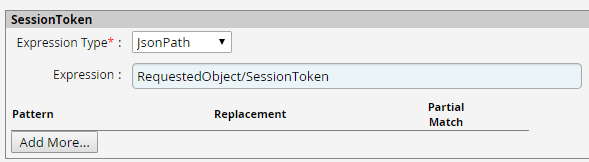
-
java.net.UnknownHostException can occur for the following reasons: host name is wrong, Archer endpoint is not accessible from the RSA Identity Governance and Lifecycle host, no network connectivity is available, etc.
To verify the host name, you can use the command: “ping <host name/IP>”
-
How to configure the output parameter in the Create Account command
-
Login to RSA Identity Governance and Lifecycle.
-
From the top menu bar, click AFX > Connectors
-
Click on the Archer Connector for which you want to configure the output parameter.
-
Click Edit.
-
Click the Capabilities tab and then click Create an Account.
-
Under Command Output Parameters, click Add More.
-
Provide ‘Account Id’ as ‘Parameter Name’ and select ‘Account.User_Id’ as ‘Mapping’.
-
In ‘Account Id’ response at the end of the page, select ‘JsonPath’ as ‘Expression Type’ and add ‘RequestedObject/Id’ as ‘Expression’
-
Click OK to save the configurations
-
-
Archer supports SSL configuration and allows communication over HTTPS protocol. To use secure communication, make sure that the default trust-store has Archer Server certificates added. If the chaining of certificate is required to reach the Archer endpoint from the RSA Identity Governance and Lifecycle instance, ensure that default trust-store has all the required network certificates as well.
If the valid certificates are not in the proper keystore, SSLHandshakeException can be observed:
javax.net.ssl.SSLHandshakeException: sun.security.validator.ValidatorException: PKIX path building failed: sun.security.provider.certpath.SunCertPathBuilderException: unable to find valid certification path to requested target
Certification environment
Date tested: November 2024
|
Product Name |
Version Information |
Operating System |
|---|---|---|
|
Archer |
2024.09 |
Windows |
|
RSA IGL |
Latest |
SAAS |