Using IT Controls Assurance
The IT Controls Assurance use case supports the following processes.
On this page
Process Diagram
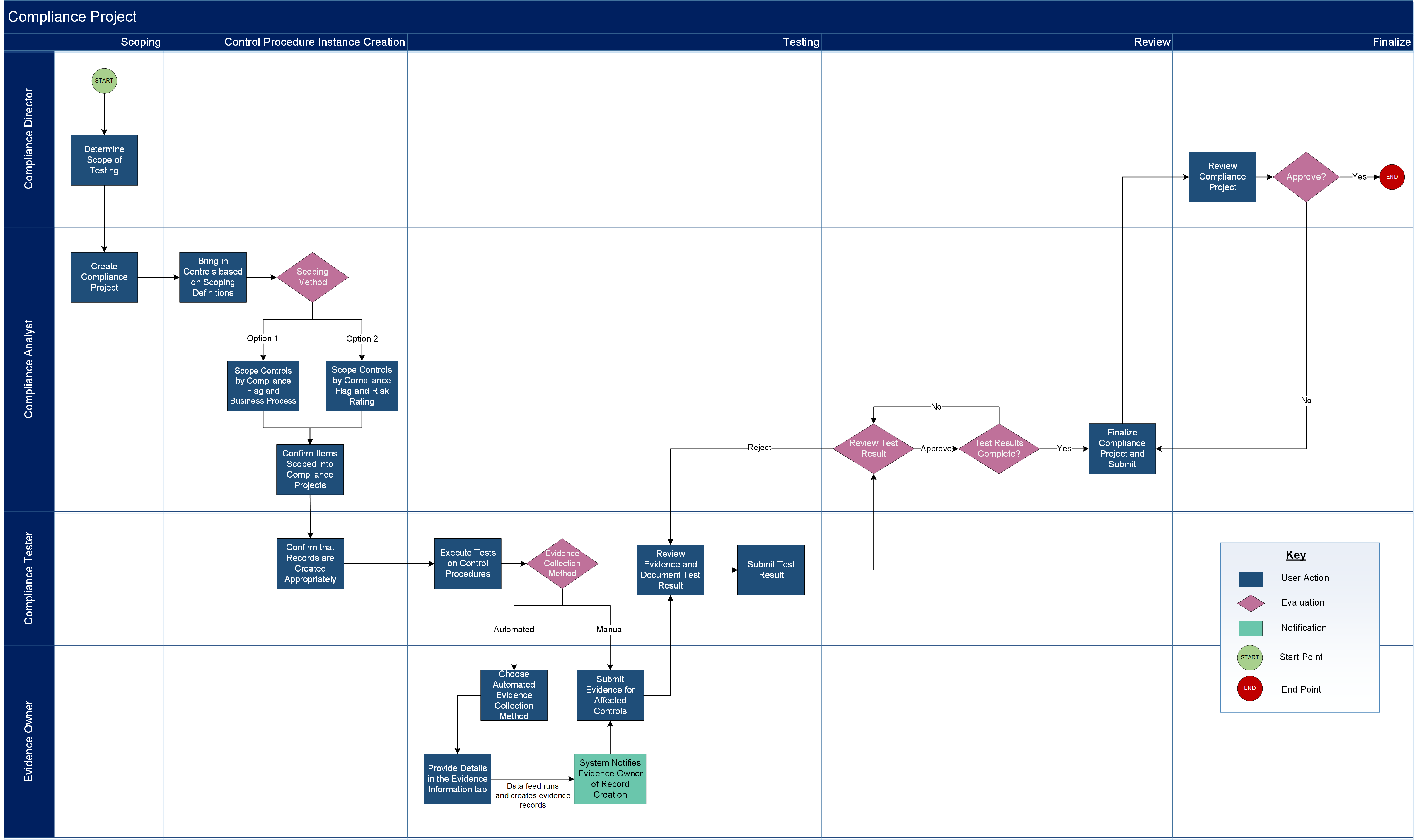
The following diagram illustrates the overall Archer IT Controls Assurance process.
Download the source file of the diagram here: IT Controls Assurance Process Diagram
Creating Primary Controls
The Primary Controls application serves as a central repository for controls, baselines, and activities that are mapped to corporate control standards, which establishes the foundation for enterprise-wide risk monitoring and compliance measurement.
Creating Control Procedures
Through the Control Procedures application, you can create control procedures and link them to previously created Primary Controls. Control procedures house instances of controls, which you can use to manage your overall risk monitoring and compliance measuring. There are 2 types of control procedures: Technical and Process. Based on the selected control type, different pieces of information are captured and different testing options are available.
Creating a Compliance Scope Record
The Compliance Scope application allows you to capture a repeated scope of compliance that can be tested consistently. The IT Controls Assurance use case allows you to catalog all of your organization's compliance engagements and assess what controls are created, why, how, and by whom. You can determine the scope of testing in the Compliance Scope application and the Compliance Engagement application.
Creating a Compliance Engagement
The Compliance Engagement application allows users to manage their testing life cycle, auto scope records, and create multiple tests at once.
Testing Controls
Controls can be tested at a specific instance level to see whether it passes and then roll the results up to the Primary level to see how the Control performs overall. There are 3 different types of tests: Control Self-Assessment, Design, and Operating. You can create multiple tests in the Compliance Engagement application or individually in each test application.
Managing the Evidence Repository
After controls have been tested, you can manage your evidence repository by creating evidence records, submitting evidence for review, and publishing approved evidence.


