Cross-Reference Mismatches
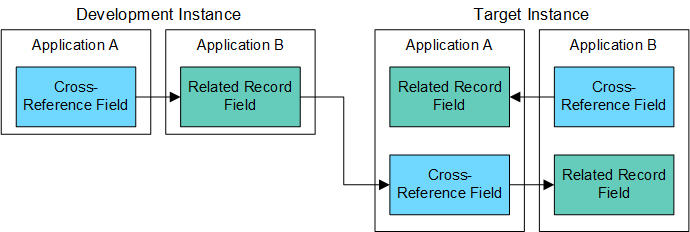
A common mistake when manually recreating cross-reference fields in multiple instances is to accidentally switch the location of the cross-reference and related records fields. For example, the following figure shows a cross-reference field that was created in application A and a related record field in application B in the source (development) instance. In the target (test) instance, the cross-reference field was inadvertently created in application B and the related record field in application A.
Download the source file of the diagram here: Platform - Cross-Reference Mismatched Fields Diagram

If you create a package in the source instance and install it in the target instance, the package installation creates new cross-reference and related record fields in the target instance. The existing cross-reference and related records fields are not modified or deleted. The following figure shows duplicate fields created because the original fields were switched in the target instance.
Download the source file of the diagram here: Platform - Cross-Reference Duplicate Fields Diagram
To prevent this situation, before creating and installing the package, manually update the source instance (recommended) or the target instance so that both instances match.


